浏览报告
概览
报告区是查看采集数据分析结果的地方。 您大多会使用报告区来查看协议解码结果。
此处可查看数种报告:
- Protocol decoder result(依不同协议而异)

- Transition report(0、1 逻辑电平与时间戳)

- Waveform statistics(周期、频率、边沿计数等)

Report Toolbar
 :切换至 Transition 报告
 :切换至 Protocol decoder 报告
 :切换至 Waveform statistics 报告
 :将报告数据导出为 TXT/CSV 格式
 :刷新分析结果,用于协议解码器与波形统计报告
 :跳至特定行号
Transition report
显示各通道的逻辑电平转换记录。
示例:
| Timestamp (hh:mm:ss.ms.us.ns) | CH-00 | CH-01 | CH-02 | CH-03 |
|---|---|---|---|---|
| 12:00:00.000.000.000 | 0 | 1 | 1 | 0 |
| 12:00:01.000.000.752 | 1 | 1 | 0 | 1 |
| 12:00:02.000.001.999 | 1 | 0 | 0 | 0 |
Waveform statistics
对信号特性执行自动化测量。这是后处理分析功能,亦即无需在采集前预先设置。取得数据后,您只需单击想要测量的项目,软件即会自动计算并刷新测量值。
Available measurement items
| Measurement item | Description |
|---|---|
| Period | 连续上升(或下降)边沿之间的时间 |
| Frequency | 每秒周期数 |
| Edge count | 转换总次数 |
| Cycle count | 完整周期总数 |
| Positive cycle count | 高脉冲数 |
| Negative cycle count | 低脉冲数 |
| Positive pulse count | 正脉冲计数 |
| Negative pulse count | 负脉冲计数 |
| Positive pulse width | 高脉冲持续时间 |
| Negative pulse width | 低脉冲持续时间 |
| Channel-to-channel rising delay | 从通道 A 上升至通道 B 上升的时间 |
| Channel-to-channel falling delay | 从通道 A 下降至通道 B 下降的时间 |
| Channel rising to channel falling delay | 从通道 A 上升至通道 B 下降的时间 |
| Channel falling to channel rising delay | 从通道 A 下降至通道 B 上升的时间 |
| Phase delay | 两信号之间的相位关系 |
Configuration
- Select channel:选择要测量的通道
- Select measurement type:从可用统计项目中选取(见上表)
- Set range (optional):使用游标限制测量范围,默认范围为整个波形区
Protocol decoder report
我们的分析仪提供丰富的协议信息(完整参考文档即将推出)。
Customized Report
有时您可能只想聚焦报告的特定部分,或同时比较多个解码器报告。自定义报告正是为此而设。
Configuration
在报告窗口工具栏的下拉列表中选取 Customized Report 项目。

选取要包含的字段。以下示例中,我们可能只选择 I2C 解码器的数据位。
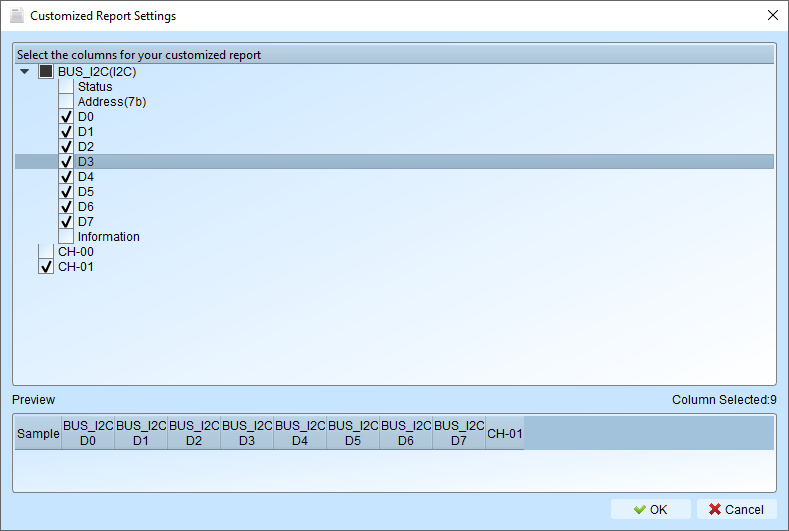
使用场景
在多数场景中,我们会解码不同协议并观察它们如何相互关联。例如,在电源控制系统中,I2C 与 USB PD 共存且可能互相影响。此时自定义报告就很有用。