System environment options
Language

Available languages
- English
- Traditional Chinese (繁體中文)
- Simplified Chinese (简体中文)
Options

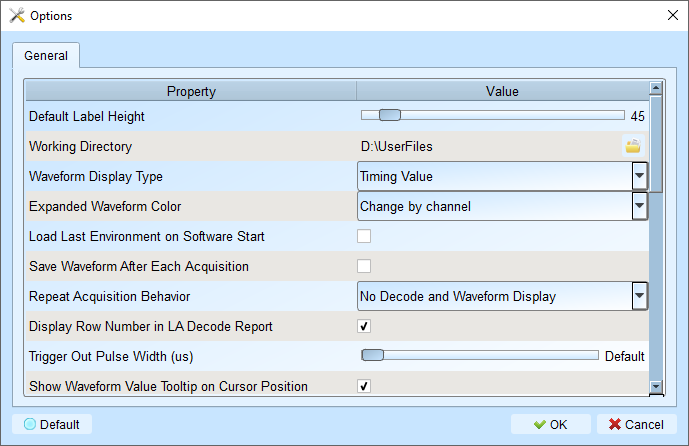
All values marked bold are the default values.
Default Label Height: 45 - Modify the default channel height in the waveform area.-
Working Directory: Location for temporary files and waveforms during operation.- For Windows users: default to C:\Users\
\Documents\Acute\
- For Windows users: default to C:\Users\
-
Waveform Display Type: Time value - Choose what to display between waveform edges:- Time value: Show duration of high/low states
- Logic value: Show 0/1 on the waveform
- None: Clean waveform view
- Time value (Without Unit): Show duration of high/low states without unit
-
Expanded Waveform Color: Channel by channel - Enable different colors for each channel.- Same as origin: Unified color for all channels.
- Channel by channel: Enable different colors for each channel.
-
Load Last Environment On Software Start: Disabled - Restore previous settings (not waveforms) when launching the application. -
Save Waveform After Each Acquisition: Disabled - Automatically save to working directory after capture. This is useful for repeated captures. -
Repeat Acquisition Behavior: No Decode and Waveform Display - Configure waveform decoding display during repeat captures.- No Decode and Waveform Display: Faster acquisition, analyze later
- Apply Decode and Waveform Display (1s Gap): Update waveform decoding display every 1 second
- Apply Decode and Waveform Display (2s Gap): Update waveform decoding display every 2 seconds
- Apply Decode and Waveform Display (5s Gap): Update waveform decoding display every 5 seconds
Trade-off: Faster updates provide real-time feedback but may impact performance with complex decodes.
-
Display Row Number In LA Decode Report: Enabled - Show row numbers on the left side of the report area. -
Trigger Out Pulse Width (μs): Default - Default length from trigger point to end of capture. -
Show Waveform Value Tooltip On Cursor Position: Enabled - Display channel numbers and bus decode names when hovering over cursor. -
Auto-reconnect Device: Enabled - Automatically reconnect when device is re-plugged after going offline. -
Show Channel Information In Waveform Display: Enabled - Display channel numbers in waveform area. Show Value Information In Waveform Display: Disabled - Display current logic level in waveform area.Show Trigger Information In Waveform Display: Disabled - Display trigger setting values on channel labels.-
Show Channel Activity In Waveform Display: Disabled - Summarize edge transitions for each channel. -
Use Multicore Processing: Enabled - Enable multi-core CPU usage to speed up data processing. -
Display Waveform Time Scale Dash Line: Enabled - Add vertical lines to align waveform area with report area. -
Display Report Timestamp Information: Show Timing with Date Time Info - Choose timestamp format for report display.- Show Timing Info: Show timing information in the format of HH:MM:SS.SSS
- Show Timing Info With Date Time Info: Show timing information in the format of YYYY-MM-DD HH:MM:SS.SSS
- Show Sample Count: Show timing information in the format of 1234567890
-
Show Cursor Position In Decode/Transition Report: Enabled - Display cursor location in the report time field. -
Show Cursor Separate Time On Cursor Bar: Enabled - Show time intervals between cursors on the cursor bar. -
Cursor Font Size In Report Area: 6 - Adjust font size for cursor positions in reports (4 - 15). -
Report Data Display Byte Number: 8 - Set the number of bytes to display per report field (options: 8, 16, 24, 32). -
Enable Label Combine By Mouse Dragging: Enabled - Drag one channel label onto another to combine channels. -
Max. Logic Analyzer Cursor Measurement Tab Count: 3 - Set number of cursor measurement groups (3-10). -
Detail Report Byte Numbers: 4096 - Limit the number of bytes displayed in each detail report (options: 1024, 2048, 4096, 8192, 16384, 32768, 65536). -
Stop Waveform Acquisition When Cursor Reaches End Of Capture: Disabled - Stop waveform acquisition when cursor reaches end of capture.
Font Settings
- Period and value display in waveform area
- Channel labels
- User notes