環境選項
語言

可用語言
- English
- Traditional Chinese (繁體中文)
- Simplified Chinese (简体中文)
選項

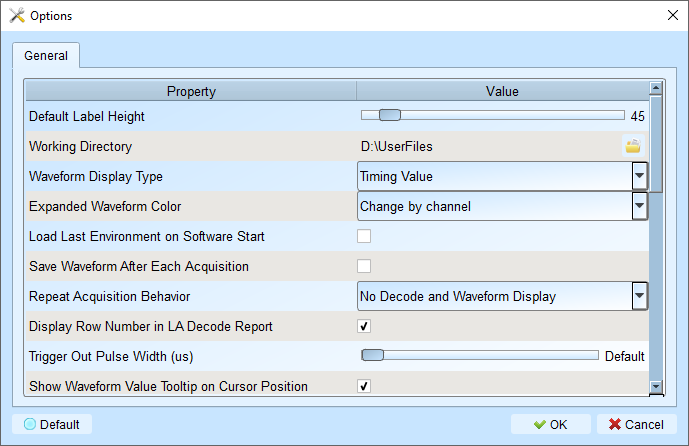
標示 粗體 的值為預設值。
Default Label Height:45 — 修改波形區的預設通道高度。-
Working Directory:作業期間暫存檔案與波形的存放位置。- Windows 使用者預設為 C:\Users\
\Documents\Acute\
- Windows 使用者預設為 C:\Users\
-
Waveform Display Type:Time value — 選擇波形邊緣之間顯示的內容:- Time value:顯示高/低狀態的持續時間
- Logic value:在波形上顯示 0/1
- None:簡潔波形檢視
- Time value (Without Unit):顯示高/低狀態持續時間,不顯示單位
-
Expanded Waveform Color:Channel by channel — 為各通道啟用不同顏色。- Same as origin:所有通道使用統一顏色。
- Channel by channel:為各通道啟用不同顏色。
-
Load Last Environment On Software Start:Disabled — 啟動應用程式時還原先前的設定(不含波形)。 -
Save Waveform After Each Acquisition:Disabled — 每次擷取後自動儲存至工作目錄。適用於重複擷取。 -
Repeat Acquisition Behavior:No Decode and Waveform Display — 設定重複擷取期間的波形解碼顯示行為。- No Decode and Waveform Display:較快擷取,稍後再分析
- Apply Decode and Waveform Display (1s Gap):每 1 秒更新波形解碼顯示
- Apply Decode and Waveform Display (2s Gap):每 2 秒更新波形解碼顯示
- Apply Decode and Waveform Display (5s Gap):每 5 秒更新波形解碼顯示
取捨:更新越快可提供即時回饋,但複雜解碼可能影響效能。
-
Display Row Number In LA Decode Report:Enabled — 在報告區左側顯示列號。 -
Trigger Out Pulse Width (μs):Default — 從觸發點至擷取結束的預設長度。 -
Show Waveform Value Tooltip On Cursor Position:Enabled — 游標懸停時顯示通道編號與匯流排解碼名稱。 -
Auto-reconnect Device:Enabled — 裝置離線後重新插入時自動重新連接。 -
Show Channel Information In Waveform Display:Enabled — 在波形區顯示通道編號。 Show Value Information In Waveform Display:Disabled — 在波形區顯示目前邏輯位準。Show Trigger Information In Waveform Display:Disabled — 在通道標籤上顯示觸發設定值。-
Show Channel Activity In Waveform Display:Disabled — 摘要各通道的邊緣過渡。 -
Use Multicore Processing:Enabled — 啟用多核心 CPU 以加速資料處理。 -
Display Waveform Time Scale Dash Line:Enabled — 加入垂直線以對齊波形區與報告區。 Use Multicore Processing:Enabled — 啟用多核心 CPU 以加速資料處理。-
Display Report Timestamp Information:Show Timing with Date Time Info — 選擇報告顯示的時間戳記格式。- Show Timing Info:以 HH:MM:SS.SSS 格式顯示時間資訊
- Show Timing Info With Date Time Info:以 YYYY-MM-DD HH:MM:SS.SSS 格式顯示時間資訊
- Show Sample Count:以 1234567890 格式顯示時間資訊
-
Show Cursor Position In Decode/Transition Report:Enabled — 在報告時間欄位顯示游標位置。 -
Show Cursor Separate Time On Cursor Bar:Enabled — 在游標列上顯示游標之間的時間間隔。 -
Cursor Font Size In Report Area:6 — 調整報告中游標位置的字型大小(4 - 15)。 -
Report Data Display Byte Number:8 — 設定每個報告欄位顯示的位元組數(選項:8、16、24、32)。 -
Display Waveform Time Scale Dash Line:Enabled — 加入垂直線以對齊波形區與報告區。 -
Enable Label Combine By Mouse Dragging:Enabled — 將一個通道標籤拖曳至另一個以合併通道。 -
Max. Logic Analyzer Cursor Measurement Tab Count:3 — 設定游標量測群組數量(3-10)。 -
Detail Report Byte Numbers:4096 — 限制每份詳細報告顯示的位元組數(選項:1024、2048、4096、8192、16384、32768、65536)。 -
Stop Waveform Acquisition When Cursor Reaches End Of Capture:Disabled — 游標到達擷取結尾時停止波形擷取。
字型設定
- 波形區的週期與數值顯示
- 通道標籤
- 使用者備註