Target mode
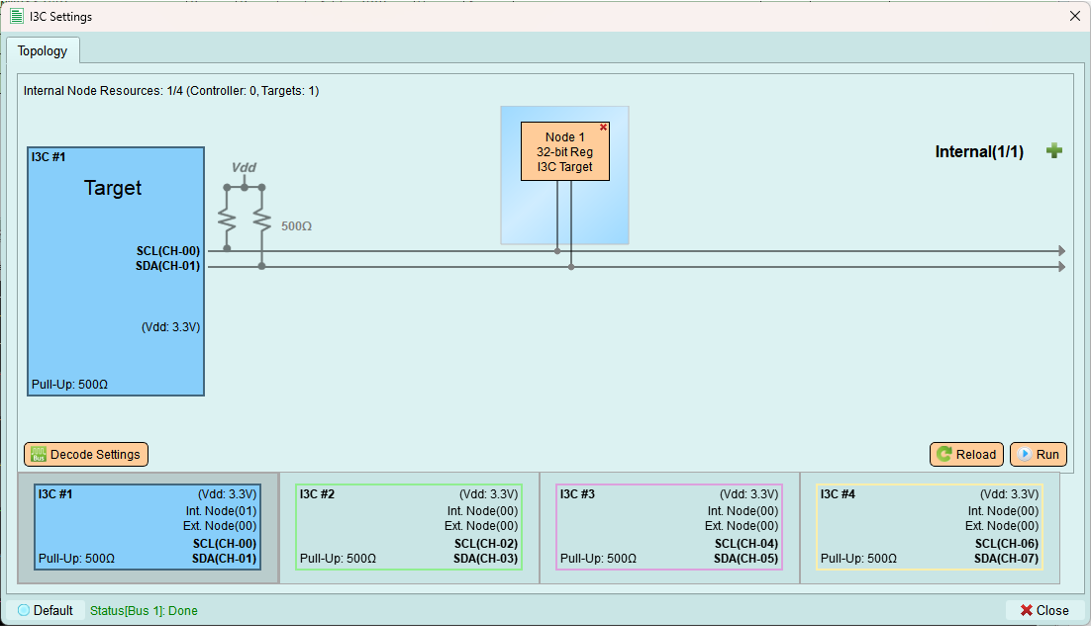
Configure the exerciser to act as an I3C target device responding to an external controller.
Overview
Target mode allows the exerciser to simulate one or more I3C target devices. Use this mode when you have an external controller and want to test its behavior with simulated targets.
Use cases:
- Test controller implementations
- Simulate sensors, memory, or peripheral devices
- Verify dynamic address assignment from controller perspective
- Test IBI (In-Band Interrupt) handling
Decode settings
Configure Logic Analyzer parameters for I3C signal decoding.
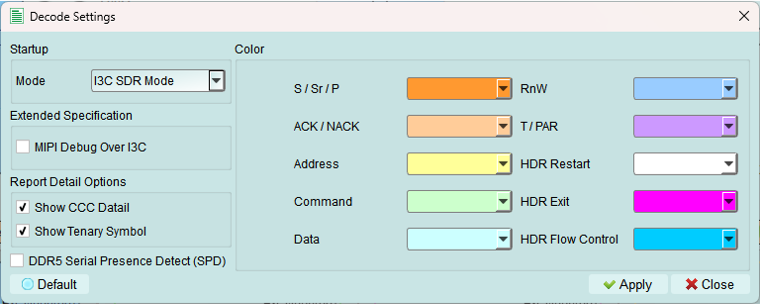
Configuration is identical to Controller mode.
Options
- Color: Select colors for Logic Analyzer decode elements
- Customize visual appearance
-
Improve readability
-
Startup mode: Select initial decode mode
- SDR mode (default): Standard operation - recommended for normal use
-
HDR modes: High Data Rate variants
-
Extended specification: Enable MIPI I3C debug information
- Additional protocol details
-
Useful for compliance and debugging
-
Report detail option: Enable detailed decode information
- Verbose output with timing details
- Helpful for in-depth analysis
Run
Upload the topology configuration to the exerciser device.
What's uploaded:
- Internal node configurations
- Target device characteristics (PID, BCR, DCR)
- Register settings
Note: Some controller-specific steps (like address table setup and timing configuration) are not available in Target mode.
Run process
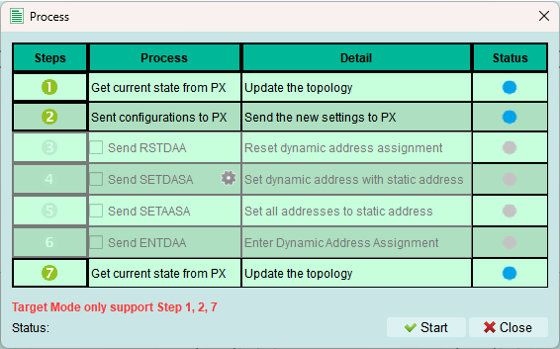
The Run process executes configuration steps for Target mode.
Status indicators:
 Error occurred - Check status message
 Wait for processing - Step executing
 Skip this process - Not needed
 Process succeeded - Step complete
Successful activation
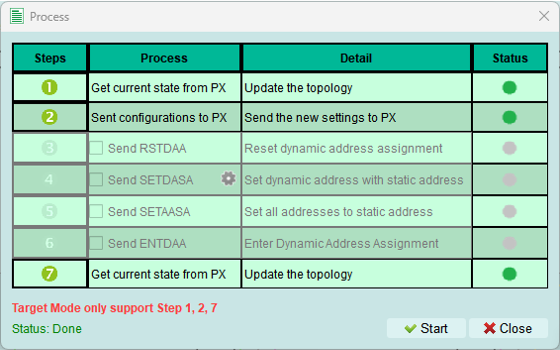
When the process completes successfully:
- Target devices are active
- Exerciser awaits controller commands
- Ready to respond to bus transactions
Reload
Refresh the topology from the exerciser device and display it in the software.
Identical to Controller mode functionality.
Use cases:
- Verify current device configuration
- Sync after programmatic changes (e.g., Python API)
- Check dynamic address assignments received from controller
- Refresh display after manual device updates
Target behavior
Responding to commands
In Target mode, the exerciser:
- Waits for controller to assign dynamic addresses (DAA)
- Responds to Common Command Codes (CCC)
- Handles private READ/WRITE transactions
- Can generate IBI requests (if configured)
- Supports hot-join (if enabled)
Address assignment
Static address (optional):
- Target announces static address during bus initialization
- Controller may assign a dynamic address during ENTDAA
Dynamic address:
- Received from controller during dynamic address assignment
- Stored and used for subsequent transactions
- Can be reassigned by controller using SETNEWDA CCC
Limitations in Target mode
Not available:
- Address table configuration (controller function)
- Timing settings (controller sets bus timing)
- Initiating transactions (only controller can initiate)
- Scanning for devices (controller function)
Available:
- Internal node configuration
- Decode settings
- Run and Reload operations
- Response to all controller commands
Testing with Target mode
Setup for controller testing
- Configure target device characteristics (PID, BCR, DCR)
- Add internal nodes if simulating multiple targets
- Set up decode settings for capture
- Click Run to activate targets
- Connect external controller
- Start capture
- Controller performs DAA and sends commands
- Verify target responses in captured data
Tips and best practices
Device characteristics
- Use realistic PID, BCR, DCR values from actual devices
- Configure BCR to match device capabilities you're simulating
- DCR should match the device type class
Internal nodes
- Create multiple internal nodes to test multi-target scenarios
- Mix I3C and I2C legacy devices
- Test edge cases with unusual device combinations
Verification
- Always capture during target testing
- Verify dynamic address assignment succeeds
- Check IBI behavior if configured
- Confirm CCC responses are correct
- Validate private transaction handling