I2C (Inter-Integrated Circuit)
I2C Protocol Analyzer settings. For Channel UI differences by product family, see Settings.
Settings
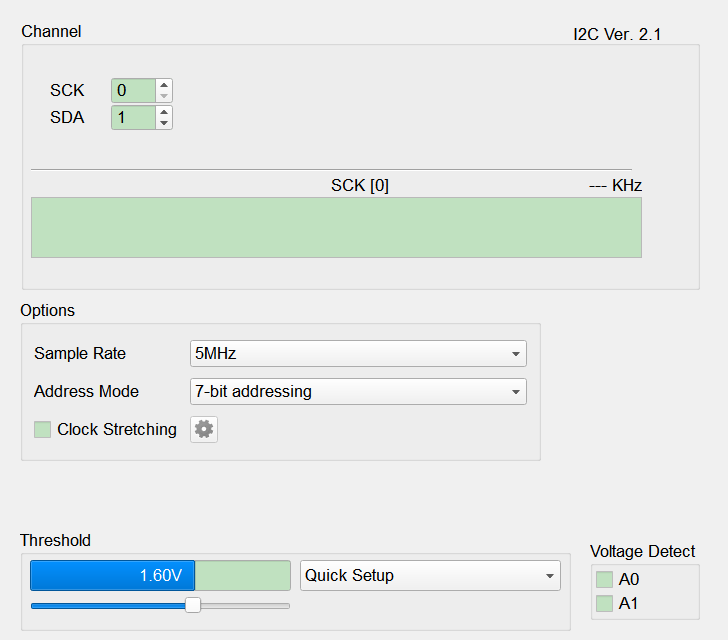
- Settings:
- Options: Protocol analysis parameters.
- Sample Rate: Choose a rate high enough for the I2C bus (typically ≥ 5–10× the bus clock).
- Address Mode: Address display / decode mode.
- 7-bit addressing: 7-bit address + 1-bit R/W.
- 8-bit addressing (Include R/W in Address): Fold R/W into an 8-bit address.
- 10-bit addressing: 10-bit address mode.
- Clock Stretching: When checked, enable clock-stretch handling; open Clock Stretching Settings via the gear (shared with SMBus / PMBus); gear is disabled (Disable) when cleared. Default: cleared.
- Clock stretching: Detect when a slave holds SCL low to stretch the clock. Default: cleared.
- Timeout check (Range: 0 ns ~ 67 ms): Flag stretches longer than the limit. When checked, the value field is enabled (Enable) (enter ns); when cleared it is disabled (Disable). Default: cleared, value empty.
- Violation check: Flag non-compliant clock stretching. Default: cleared.
- Options: Protocol analysis parameters.
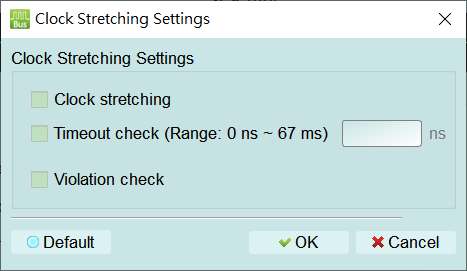
Open this dialog from the gear next to Clock Stretching to configure how the analyzer detects or flags clock stretching (a slave holding SCL low so the master waits):
- Clock stretching: Enable detection of clock stretching. Default: cleared.
- Timeout check (Range: 0 ns ~ 67 ms): Flag a stretch that exceeds the allowed duration. When checked, the value field is enabled (Enable) — enter ns (about 0–67 ms); when cleared the value field is disabled (Disable). Default: cleared, value empty.
- Violation check: Flag non-compliant clock stretching. Default: cleared.