eSPI (Enhanced Serial Peripheral Interface)
eSPI Protocol Analyzer settings. For Channel UI differences by product family, see Settings.
Supported Models
LA3000/LA4000
LA3000/LA4000 is supported only on B series.
TravelLogic
TL3000 is supported only on Plus series.
| TL4134E | TL4134B | TL4234B |
|---|---|---|
| ● |
BusFinder
BF6000 is supported only on B series, all BF7000 models are supported.
Protocol Exerciser
PX2816B is supported.
MSO2000/3000
| MSO2008E | MSO2116E | MSO2116B | MSO2216B | MSO2216B+ | MSO2416B+ |
|---|---|---|---|---|---|
| ● | ● | ● |
| MSO2216M+ | MSO2116E+ | MSO2116B+ |
|---|---|---|
| ● |
All MSO3000 models are supported.
TravelScope 3000
All TS3000 models are supported.
Settings
- Settings:
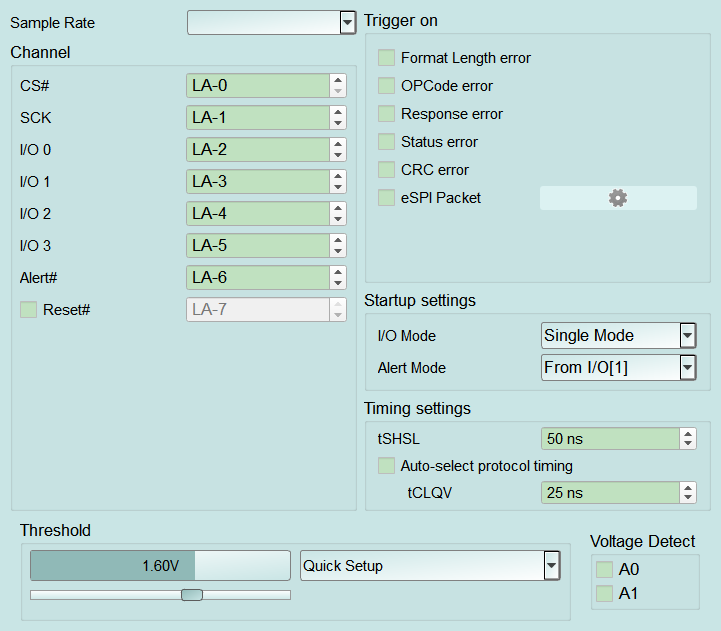
- Sample Rate: eSPI analysis sample rate (typical choices 1 GHz / 500 / 250 / 200 MHz). Too low may fail to decode. Default: 500 MHz.
- Startup settings — I/O Mode: Bus I/O width (Single Mode / Dual Mode / Quad Mode). A wrong setting can shift decoding. Default: Single Mode.
- Startup settings — Alert Mode: Alert source (From I/O[1] / From Alert#). Enabling extra CS (CS_B/C/D) forces From Alert# and disables (Disable) this field. Default: From Alert#.
- Timing settings — tSHSL / tCLQV: Chip-select related timings in ns. Default: tSHSL 50 ns, tCLQV 25 ns.
- Timing settings — Auto-select protocol timing: When checked, protocol timing is applied automatically and tCLQV is disabled (Disable); when cleared, tCLQV is enabled (Enable). Default: cleared.
-
Trigger settings:
- Error triggers: Format Length error / OPCode error / Response error / Status error / CRC error. Default: all cleared.
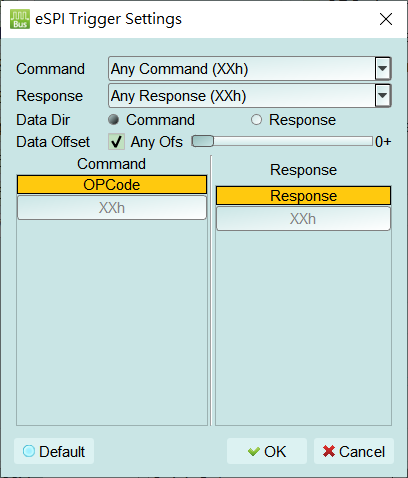
- eSPI Packet: Trigger on command/response content; when checked the gear is enabled (Enable) and opens eSPI Trigger Settings (see popup notes). First check often opens the dialog. Default: cleared.
- Command / Response: Command and response match conditions (e.g. Any Command / Any Response). First open / Default is typically Any (OPCode shows XXh).
- Data Dir: Command or Response.
- Data Offset: Any Ofs or a fixed offset. Dialog Default: Any Ofs, offset 0.
- Command / Response fields: e.g. OPCode, Response; XXh = don't care.
- Default: Restore the dialog to Any / don't-care conditions. Open this dialog from the gear next to eSPI Packet to trigger on command/response content (for example a specific OPCode or a data pattern in one direction):
-
Command / Response: Match conditions (e.g. Any Command / Any Response). First open / Default is typically Any (OPCode shows XXh).
- Data Dir: Command or Response.
- Data Offset: Any Ofs or a fixed offset. Default: Any Ofs, offset 0.
- Command / Response fields: e.g. OPCode, Response; XXh = don't care.
- Default: Restore Any / don't-care conditions.