SGMII (Serial Gigabit Media Independent Interface)
SGMII Protocol Analyzer settings. SGMII analysis shows two layers: line-side PCS (Physical Coding Sublayer / PHY) and MAC-side GMII (Gigabit Media Independent Interface). Decide which layer you need before setting triggers.
For application notes, probe connection, and measurement details, see Protocol Solution — SGMII.
Supported Models
BusFinder
BF6000 is supported only on B series, all BF7000 models are supported. This feature requires purchasing an additional option.
Settings
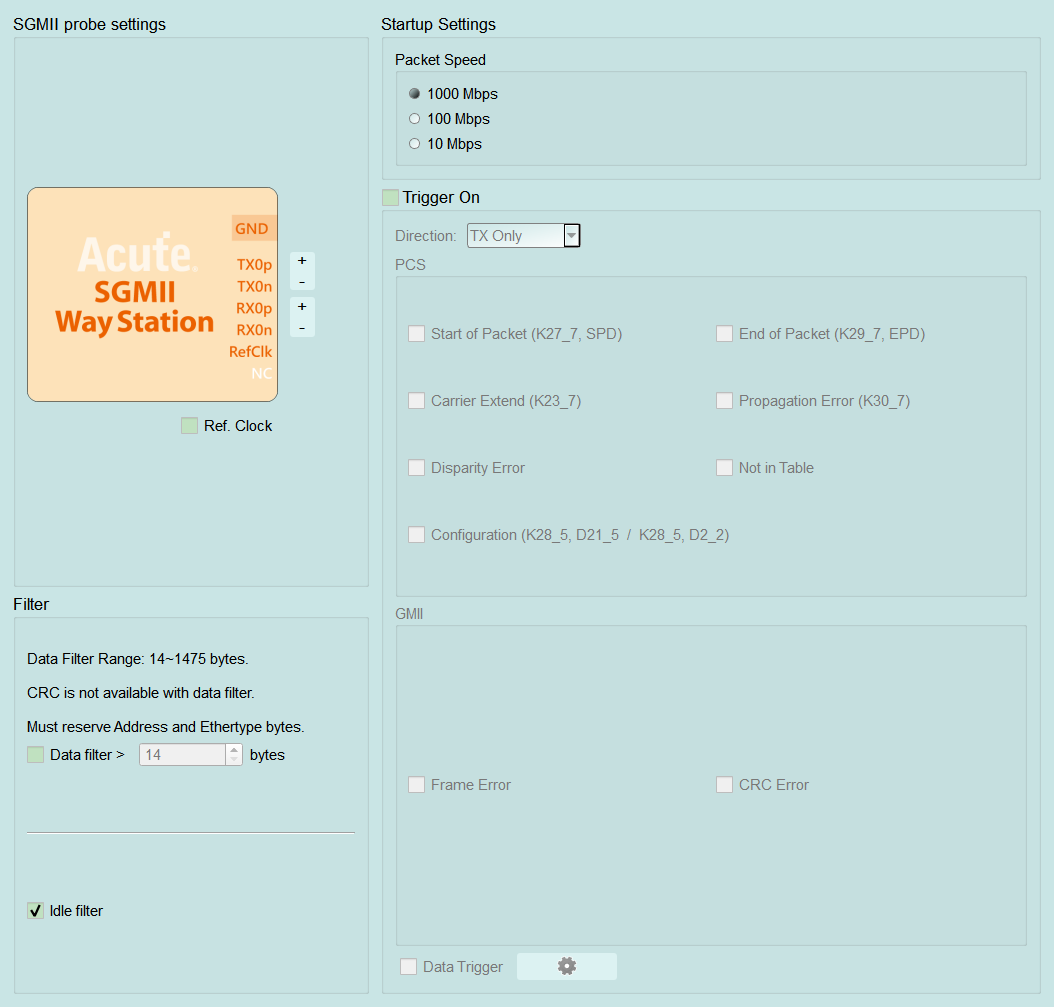
- Settings:
- SGMII probe settings: Shows the Acute SGMII Way Station pinout (e.g. TX0p/TX0n, RX0p/RX0n, RefClk). Swap Lane p/n to match differential wiring. SGMII uses 8b/10b, so the analyzer can usually recover the clock from the differential data and a Reference clock (RefClk) is optional. If the DUT provides RefClk and you want the analyzer to use that external reference, wire it to the Way Station RefClk port and enable Ref. Clock. Default: Ref. Clock cleared.
- Startup Settings — Packet Speed: Sets the initial packet speed (1000/100/10 Mbps). A wrong setting can inflate decoded data volume by about 10×/100×. If a Speed Config packet appears during capture, the speed follows that Config afterward. Default: 1000 Mbps.
- Filter: Drop unneeded traffic to save memory.
- Data filter > N bytes: Truncate long packet payloads (about 14–1475 bytes). CRC is unavailable while enabled; keep Address and Ethertype. Default: cleared, N = 14.
- Idle filter: Drop Idle symbols so idle traffic does not fill memory. Default: cleared.
-
Trigger settings:
- Trigger On: When enabled, trigger by Direction (e.g. TX Only / RX Only). SGMII analysis shows two layers: line-side PCS and MAC-side GMII. Trigger on events/errors at either layer, or use Data Trigger for detailed pattern matching. Default: Trigger On cleared; Direction TX Only; all PCS/GMII event and error items cleared.
- PCS (Physical Coding Sublayer, PHY side): Handles 8b/10b coding, K codes, and link-control symbols on the serial wire. Typical triggers: Start/End of Packet, Carrier Extend, Propagation Error, Disparity Error, Not in Table (illegal code group), and Configuration (ordered sets used for link/speed setup). Default: all items cleared.
- GMII (Gigabit Media Independent Interface, MAC side): Frame data between MAC and PHY. Typical triggers: Frame Error and CRC Error. Default: all items cleared.
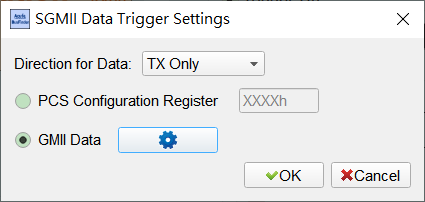
- Data Trigger: Opens SGMII Data Trigger Settings. Choose PCS Configuration to catch link-setup traffic, or GMII Data to match Ethernet frame content (see the dialog notes below). Default: cleared; when opened, PCS Configuration is selected.
- Direction for Data: Choose which direction to match (e.g. TX Only). Default: TX Only.
- PCS Configuration Register: Trigger on PCS Configuration values (PCS control information for link/speed negotiation), not ordinary data packets. XXXXh means don't care. Default: XXXXh.
- GMII Data: The gear opens GMII Trigger Settings to match MAC frame fields (addresses / Ethertype / data). Dialog Default: address/Data bytes XXh, Ethertype XXXXh, Data Offset cleared (offset 0). Open SGMII Data Trigger Settings from Trigger On → Data Trigger when you need a detailed match on a chosen direction, not only a general PCS/GMII event:
- Trigger On: When enabled, trigger by Direction (e.g. TX Only / RX Only). SGMII analysis shows two layers: line-side PCS and MAC-side GMII. Trigger on events/errors at either layer, or use Data Trigger for detailed pattern matching. Default: Trigger On cleared; Direction TX Only; all PCS/GMII event and error items cleared.
-
Direction for Data: Choose which direction to match (e.g. TX Only). Default: TX Only.
- PCS Configuration Register: Trigger on PCS Configuration values — PCS/PHY-side control information used for link negotiation and speed setup, not ordinary user data packets. XXXXh means don't care. Default: XXXXh. Use this when you want to catch how the link/speed is being configured.
- GMII Data: Match GMII/MAC-side Ethernet frame content (addresses, Ethertype, payload) instead; use the gear for the next dialog. Use this when you want a specific device or protocol frame.
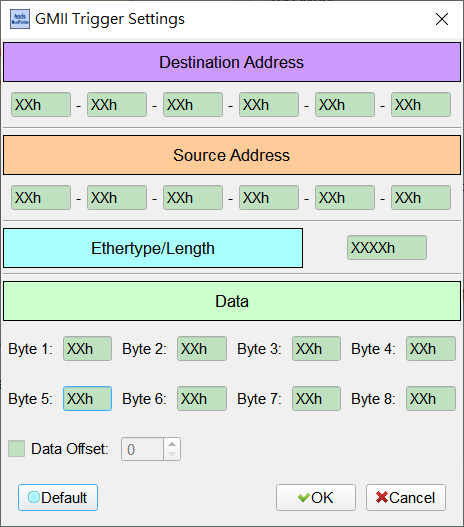
Open GMII Trigger Settings from the gear next to GMII Data to combine Ethernet frame fields (for example a specific destination, Ethertype, or payload pattern):
- Destination / Source Address: 6-byte MACs; XXh means that byte is don't care. Default: each byte XXh.
- Ethertype/Length: 2 bytes (XXXXh = don't care) to lock a protocol type or length field. Default: XXXXh.
- Data (Byte 1–8): Up to 8 hex bytes of payload pattern to match (for example
AAh 55h …); XXh means that byte is don't care. Enable Data Offset to start matching at a byte offset when the target data is not at the start of the payload. Default: each byte XXh; Data Offset cleared, offset 0. - Default: Restore the default (all don't-care) condition.