MIPI CSI (MIPI Camera Serial Interface)
MIPI CSI Protocol Analyzer settings.
For application notes, probe connection, and measurement details, see Protocol Solution — MIPI D-PHY.
Supported Models
BusFinder
All BF7000 models are supported. This feature requires purchasing an additional option.
Settings
- Settings:
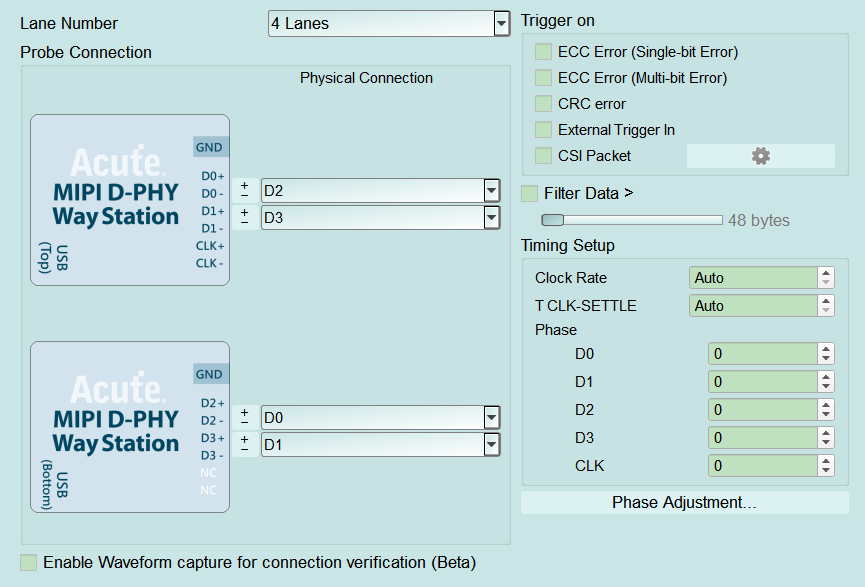
- Lane Number: Number of lanes in use (e.g. 4 Lanes). Default: 4.
- Probe Connection: Way Station mapping for D0–D3/CLK; swap lane numbers and P/N. Optional waveform capture for connection verification (Beta). Default: waveform capture cleared.
- Filter Data >: When checked the slider is enabled (Enable); drop payload beyond the set length. Default: cleared (about 48 bytes step when enabled).
- Timing Setup:
- Clock Rate / T CLK-SETTLE: Clock and settle (Auto available).
- Phase (D0–D3 / CLK): Per-lane phase; use Phase Adjustment for fine tuning. Default phase: 0.
-
Trigger settings:
- Trigger on: ECC (single/multi-bit), CRC, External Trigger In, and CSI Packet (gear enabled (Enable) when checked; opens CSI Trigger Settings — see popup notes). Default: all cleared.
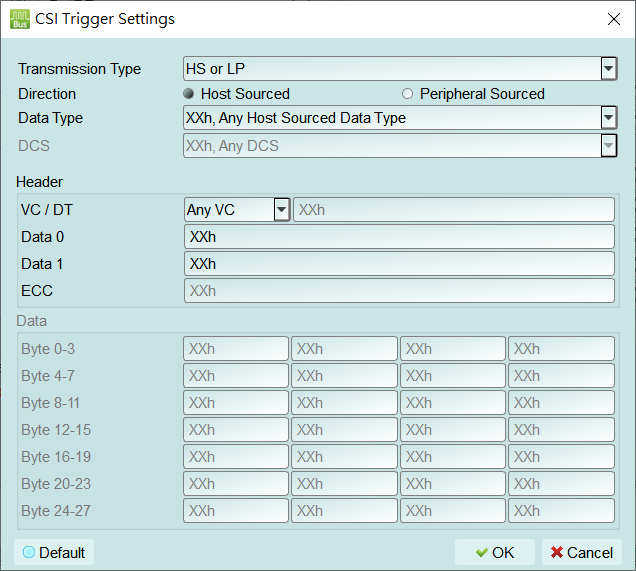
- Transmission Type: Select the transmission type (e.g. HS or LP).
- Direction: Host Sourced or Peripheral Sourced.
- Data Type / DCS: Select the data type; DCS is field enabled (Enable) depending on Data Type.
- Header: Set VC/DT, Data 0, Data 1, and ECC (XXh = don't care for that field).
- Data: Payload pattern per byte (e.g. Byte 0–27); XXh = don't care per byte.
- Default: Restore the dialog to default trigger conditions. Open this dialog from the gear next to Trigger on → CSI Packet to trigger on CSI packet fields:
- Trigger on: ECC (single/multi-bit), CRC, External Trigger In, and CSI Packet (gear enabled (Enable) when checked; opens CSI Trigger Settings — see popup notes). Default: all cleared.
-
Transmission Type / Direction / Data Type / DCS: Choose transfer type, direction, and data type; DCS availability depends on Data Type.
- Header: VC/DT, Data 0, Data 1, ECC; XXh = don't care for that field.
- Data: Payload pattern (e.g. Byte 0–27); XXh = don't care per byte.
- Default: Restore the dialog to default trigger conditions.