MII (Media Independent Interface)
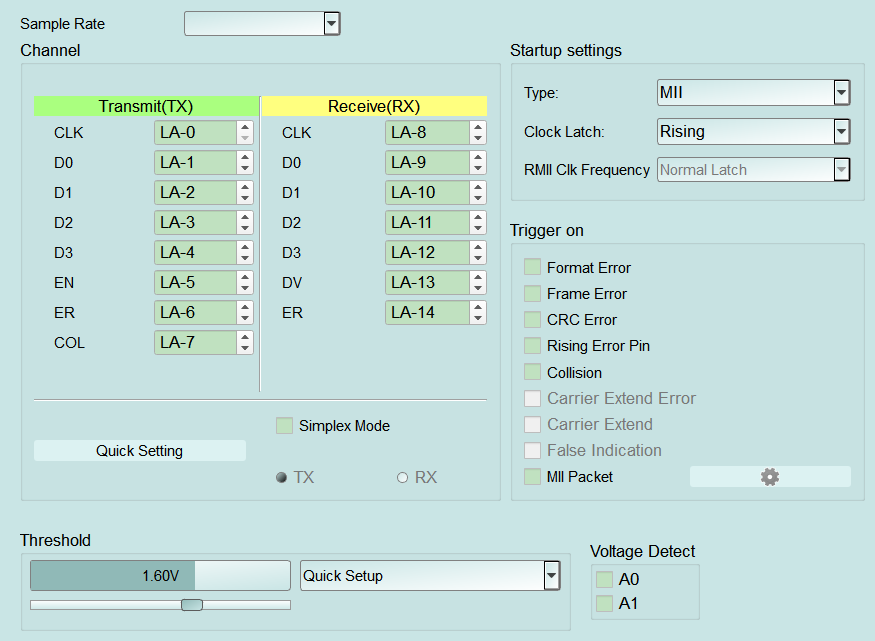
MII Protocol Analyzer settings. Depending on Type, the analyzer covers MII/RMII (some products also RGMII/GMII) for the parallel Ethernet interface between MAC and PHY. For Channel UI differences by product family, see Settings.
Supported Models
LA3000/LA4000
LA3000/LA4000 is supported only on B series.
TravelLogic
TL3000 is supported only on Plus series.
| TL4134E | TL4134B | TL4234B |
|---|---|---|
| ● |
BusFinder
BF6000 is supported only on B series, all BF7000 models are supported.
Protocol Exerciser
PX2816B is supported.
MSO2000/3000
| MSO2008E | MSO2116E | MSO2116B | MSO2216B | MSO2216B+ | MSO2416B+ |
|---|---|---|---|---|---|
| ● | ● | ● |
| MSO2216M+ | MSO2116E+ | MSO2116B+ |
|---|---|---|
| ● |
All MSO3000 models are supported.
TravelScope 3000
All TS3000 models are supported.
Settings
- Settings:
- Type: Select the interface (on many products MII / RMII; some also offer RGMII / GMII). A wrong choice misaligns channel pins and which trigger items are available. The main Default button does not reset this field.
- Clock Latch: Rising / Falling data latch edge. A wrong setting can shift decoding. Field usually disabled (Disable) for RGMII. The main Default button does not reset this field.
- RMII Clk Frequency: Field enabled (Enable) only when Type = RMII. Choose Normal Latch or Frequence Clk x10 (UI spelling); field disabled (Disable) for non-RMII types. Default: Normal Latch.
-
Trigger settings:
- Trigger on: Select error/event triggers. Availability follows Type — items are field enabled (Enable) or field disabled (Disable) (for example Carrier Extend / Carrier Extend Error / False Indication are disabled (Disable) for MII/RMII and enabled (Enable) for RGMII/GMII). Default: all cleared.
- Format Error / Frame Error / CRC Error: Trigger on format, frame-structure, or CRC errors. Default: cleared.
- Rising Error Pin: Trigger on a rising Error pin (ER); field may be disabled (Disable) for some types such as RMII. Default: cleared.
- Collision: Trigger on Collision (COL); field may be disabled (Disable) for some types. Default: cleared.
- Carrier Extend / Carrier Extend Error / False Indication: Carrier-extend related events; typically available on RGMII/GMII. Default: cleared.
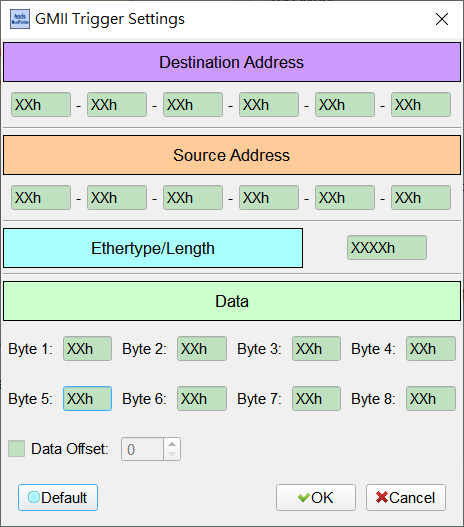
- MII Packet: Trigger on Ethernet frame content; enable then open GMII Trigger Settings via the gear (see popup notes below). Use this to trigger on destination/source, Ethertype, or a payload pattern. Default: cleared.
- Destination / Source Address: 6-byte MACs; XXh = don't care for that byte. Dialog Default: each byte XXh.
- Ethertype/Length: 2 bytes (XXXXh = don't care) to lock a protocol type or length field. Dialog Default: XXh XXh (don't care).
- Data (Byte 1–8): Payload pattern to match; enable Data Offset to start at a byte offset. Dialog Default: each byte XXh; Data Offset cleared, offset 0.
- Default: Restore the dialog to all don't-care (addresses/Data = XXh, Ethertype don't care, Data Offset off). Open GMII Trigger Settings from the gear next to MII Packet to combine Ethernet frame fields (for example a specific destination, Ethertype, or payload pattern):
- Trigger on: Select error/event triggers. Availability follows Type — items are field enabled (Enable) or field disabled (Disable) (for example Carrier Extend / Carrier Extend Error / False Indication are disabled (Disable) for MII/RMII and enabled (Enable) for RGMII/GMII). Default: all cleared.
-
Destination / Source Address: 6-byte MACs; XXh means that byte is don't care. Default: each byte XXh.
- Ethertype/Length: 2 bytes (XXXXh = don't care) to lock a protocol type or length field. Default: XXh XXh (don't care).
- Data (Byte 1–8): Up to 8 hex bytes of payload pattern to match; XXh means that byte is don't care. Enable Data Offset to start matching at a byte offset. Default: each byte XXh; Data Offset cleared, offset 0.
- Default: Restore the default (all don't-care) condition.