UART (Universal Asynchronous Receiver/Transmitter)
UART Protocol Analyzer settings. Line Wrap only affects how decoded results are segmented. For Channel UI differences by product family, see Settings.
Supported Models
TravelBus
All TB1000/TB2000/TB3000 models are supported.
LA3000/LA4000
All LA3000 models are supported except F series, all LA4000 models are supported.
TravelLogic
All TL3000/TL4000 models are supported.
BusFinder
BF6000 is supported only on B series, all BF7000 models are supported.
Protocol Exerciser
PX2816B is supported.
MSO2000/3000
All MSO1000/MSO2000/MSO3000 models are supported.
TravelScope 3000
All TS3000 models are supported.
Settings
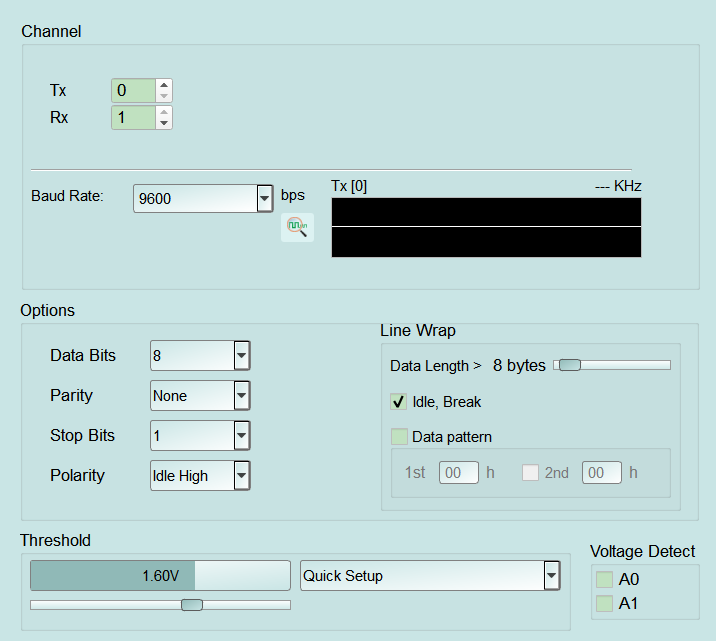
- Settings:
- Baud Rate: Bit rate in bps. A wrong setting can scramble decoding; choose from the list (some UIs also offer waveform-assisted baud detection). Default: 9600.
- Data Bits: Data bits per character (4–16). Default: 8.
- Parity: None / Odd / Even / Mark / Space. A wrong setting can produce parity errors or wrong characters. Default: None.
- Stop Bits: Stop-bit count (1–4.5, including 1.5 / 2.5, etc.). Default: 1.
- Polarity: Voltage level when Idle. Idle High is a common setting; Idle Low is for inverted signaling. A wrong setting inverts Start/Stop detection. Default: Idle High.
- Line Wrap: Controls how decoded results wrap/segment in the report (not a hardware trigger).
- Data Length > N bytes: Wrap when consecutive data exceeds N bytes (slider range about 1–128). Default: 2 bytes.
- Idle, Break: Wrap on Idle or Break so one burst is separated from the next. Default: checked.
- Data pattern: Wrap on a data pattern. Enable and set 1st […] h; optionally enable 2nd […] h to wrap on the 1st→2nd sequence. Default: cleared (1st/2nd = 00h).