SMBus (System Management Bus)
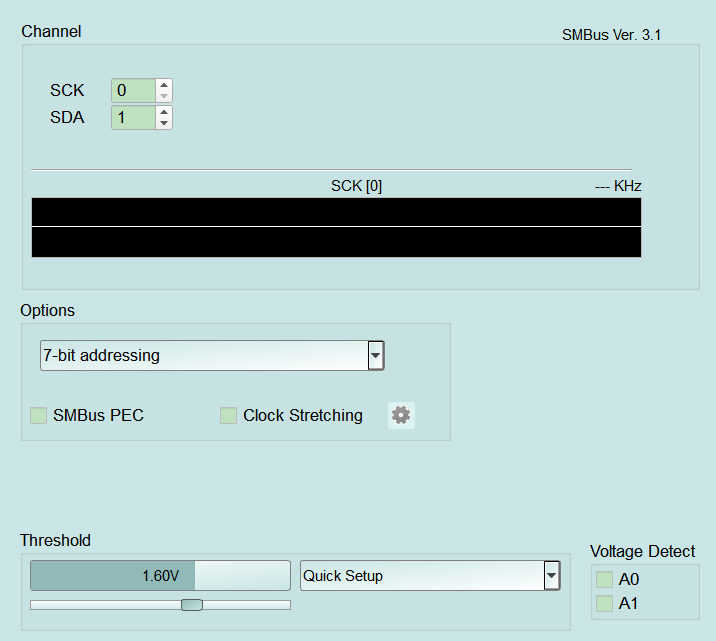
SMBus Protocol Analyzer settings. For Channel UI differences by product family, see Settings.
Supported Models
TravelBus
All TB1000/TB2000/TB3000 models are supported except F series.
LA3000/LA4000
LA3000/LA4000 is supported only on B series.
TravelLogic
TL3000/TL4000 is supported only on B series.
BusFinder
BF6000 is supported only on B series, all BF7000 models are supported.
Protocol Exerciser
PX2816B is supported.
MSO2000/3000
| MSO2008E | MSO2116E | MSO2116B | MSO2216B | MSO2216B+ | MSO2416B+ |
|---|---|---|---|---|---|
| ● | ● | ● | ● |
| MSO2216M+ | MSO2116E+ | MSO2116B+ |
|---|---|---|
| ● | ● |
All MSO3000 models are supported.
TravelScope 3000
All TS3000 models are supported.
Settings
-
Settings:
- 7-bit addressing: Addressing mode (7-bit addressing / 8-bit addressing (Include R/W in Address) / 10-bit addressing). A wrong setting mis-decodes slave addresses. Default: 7-bit addressing.
- SMBus PEC: Verify Packet Error Code (PEC). Default: cleared.
- Clock Stretching: When checked, enable clock-stretch handling and open Clock Stretching Settings via the gear (shared with I2C / PMBus); gear is disabled (Disable) when cleared. First check often opens the dialog. Default: cleared.
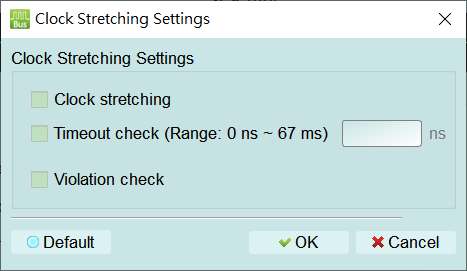
- Clock stretching: Detect when a slave holds SCL low to stretch the clock. Default: cleared.
- Timeout check (Range: 0 ns ~ 67 ms): Flag stretches longer than the limit. When checked, the value field is enabled (Enable) (enter ns, about 0–67 ms); when cleared it is disabled (Disable). Default: cleared, value empty.
- Violation check: Flag non-compliant clock stretching. Default: cleared. Open this dialog from the gear next to Clock Stretching to configure how the analyzer detects or flags clock stretching (a slave holding SCL low so the master waits):
-
Clock stretching: Enable detection of clock stretching. Default: cleared.
- Timeout check (Range: 0 ns ~ 67 ms): Flag a stretch that exceeds the allowed duration. When checked, the value field is enabled (Enable) — enter ns (about 0–67 ms); when cleared the value field is disabled (Disable). Default: cleared, value empty.
- Violation check: Flag non-compliant clock stretching. Default: cleared.