MIPI I3C (MIPI I3C)
MIPI I3C Protocol Analyzer settings. For Channel UI differences by product family, see Settings.
For application notes, probe connection, and measurement details, see Protocol Solution — MIPI I3C.
Supported Models
TravelBus
All TB3000 models are supported.
LA3000/LA4000
All LA3000/LA4000 models are supported.
TravelLogic
TL3000 is supported only on B series, all TL4000 models are supported.
BusFinder
BF6000 is supported only on B series, all BF7000 models are supported.
Protocol Exerciser
PX2816B is supported.
MSO2000/3000
All MSO1000/MSO2000/MSO3000 models are supported.
TravelScope 3000
All TS3000 models are supported.
Settings
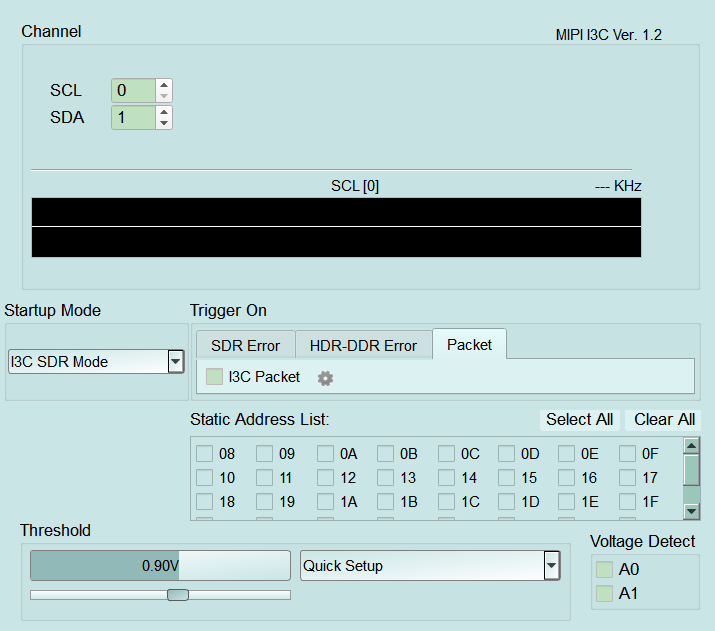
- Settings:
- Startup Mode: Mode at capture start (e.g. I3C SDR Mode).
- Static Address: Select I3C static addresses of interest (Select All / Clear All).
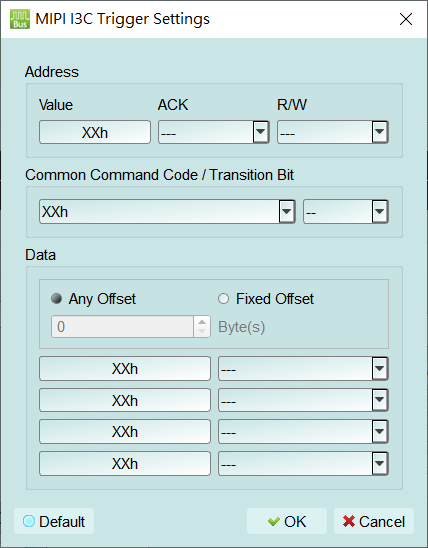
- Trigger settings:
- Trigger conditions: SDR Error, HDR-DDR Error, and Packet tabs; I3C Packet gear opens MIPI I3C Trigger Settings.
- Address: Value, ACK, R/W (XXh / --- = don't care).
- Common Command Code / Transition Bit: CCC and Transition Bit.
- Data: Any Offset / Fixed Offset and data-byte conditions.
- Default: Restore the default trigger condition. Open this dialog from the gear next to Packet → I3C Packet. Configure Address (Value/ACK/R/W), CCC/Transition Bit, and Data. XXh/--- means don't care.
- Trigger conditions: SDR Error, HDR-DDR Error, and Packet tabs; I3C Packet gear opens MIPI I3C Trigger Settings.