eDP (Embedded DisplayPort)
eDP Protocol Analyzer settings.
For application notes, probe connection, and measurement details, see Protocol Solution — eDP.
Supported Models
BusFinder
BF6000 is supported only on B series, all BF7000 models are supported. This feature requires purchasing an additional option.
Settings
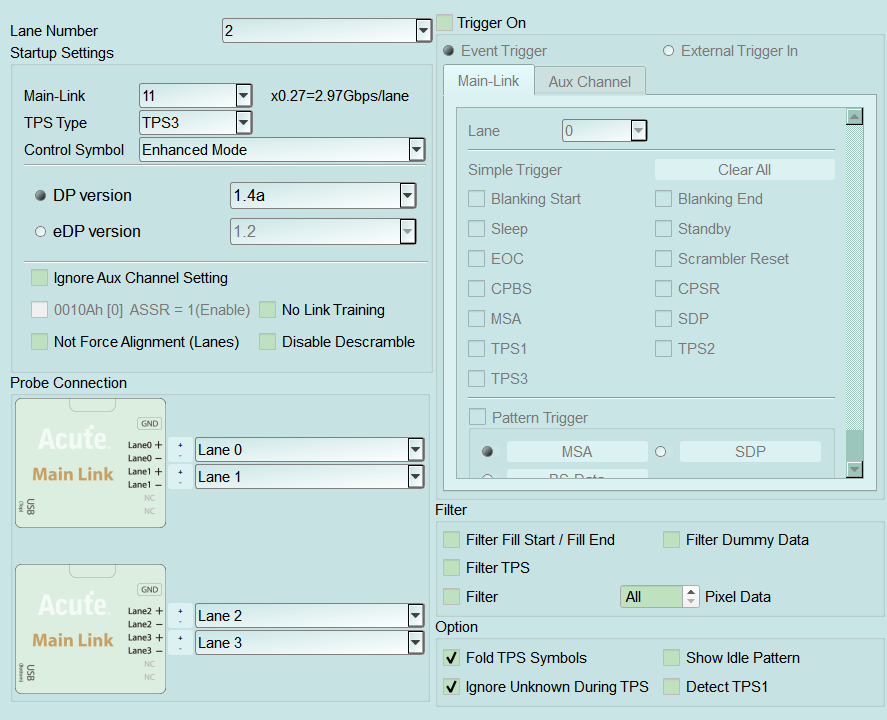
- Settings:
- Startup Settings: DUT state at measurement start; required if AUX provides no parameters during capture.
- Lane Number: Number of lanes in use (required). Default: 2 lanes.
- Main-Link: Main-Link rate (UI shows Gbps/lane). Default about 2.97 Gbps/lane.
- TPS Type / Control Symbol: Training pattern type and control-symbol mode. Default: TPS3 / Enhanced Mode.
- DP version / eDP version: Aux Channel decode version.
- Ignore Aux Channel Setting: Ignore AUX-provided settings. Default: cleared.
- No Link Training / Disable Descramble / ASRE / Not Force Alignment: Wake without TPS, skip descramble, Alternate Scrambler Seed Reset, lane alignment options. Default: all cleared.
- Probe Connection: Main Link probe vs Lane / P-N mapping; swap channel numbers and P/N as needed.
- Filter: Drop commands or pixel data to reduce volume. Default: all filters cleared.
- Filter Fill Start / Fill End
- Filter Dummy Data
- Filter TPS (TPS 1–4)
- Specific Filter (Pixel Data): All or every Nth frame (max 128).
- Option:
- Fold TPS Symbols: Fold consecutive TPS in the report and show counts. Default: checked.
- Show Idle Pattern. Default: cleared.
- Ignore Unknown During TPS: Ignore Unknown between Sleep–TPS–Scrambler Reset while lanes are not yet aligned. Default: checked.
- Detect TPS1: Enable TPS1 detection. Default: cleared.
- Startup Settings: DUT state at measurement start; required if AUX provides no parameters during capture.
- Trigger settings:
- Trigger On: Event Trigger or External Trigger In; Main-Link and Aux Channel tabs. When checked, the trigger tab is enabled (Enable). Default: cleared.
- Main-Link: Lane, Simple Trigger (K-codes/events), Pattern Trigger (MSA/SDP, etc.). Pattern Default is often MSA; XX = don't care per nibble/byte.
- Aux Channel:
- Simple Trigger: Request Start/End, Reply Start/End, Timeout. Default: all cleared.
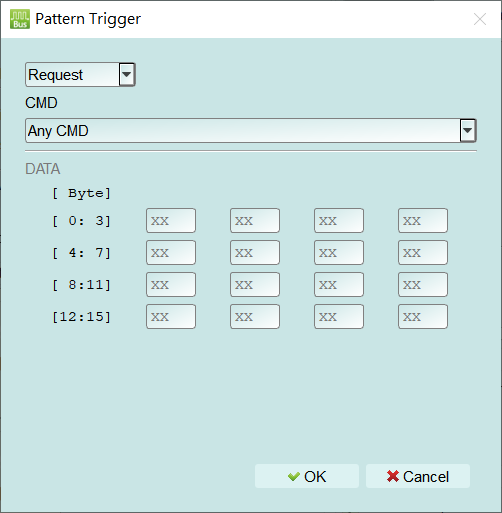
- Pattern Trigger: Enable and open the Pattern Trigger dialog via the gear (see popup notes). Default: cleared.
- Packet type (e.g. Request).
- CMD: e.g. Any CMD.
- DATA: Byte 0–15 (XX = don't care). Dialog Default: most bytes XX. Open this dialog from Trigger On → Aux Channel → Pattern Trigger via the gear. Choose the packet type (for example Request), CMD (for example Any CMD), and set a DATA pattern for Byte 0–15. Enter XX for don't-care bytes.
- Trigger On: Event Trigger or External Trigger In; Main-Link and Aux Channel tabs. When checked, the trigger tab is enabled (Enable). Default: cleared.