Modbus (Modbus)
Modbus Protocol Analyzer settings. Frame gap timeout is field enabled (Enable) only in half-duplex (Tx and Rx on the same channel) or RS485 Two-Wire configurations. For Channel UI differences by product family, see Settings.
Supported Models
TravelBus
TB1000/TB2000/TB3000 is supported only on B series.
LA3000/LA4000
LA3000/LA4000 is supported only on B series.
TravelLogic
TL3000/TL4000 is supported only on B series.
BusFinder
BF6000 is supported only on B series, all BF7000 models are supported.
Protocol Exerciser
PX2816B is supported.
MSO2000/3000
| MSO2008E | MSO2116E | MSO2116B | MSO2216B | MSO2216B+ | MSO2416B+ |
|---|---|---|---|---|---|
| ● | ● | ● | ● |
| MSO2216M+ | MSO2116E+ | MSO2116B+ |
|---|---|---|
| ● | ● |
All MSO3000 models are supported.
TravelScope 3000
All TS3000 models are supported.
Settings
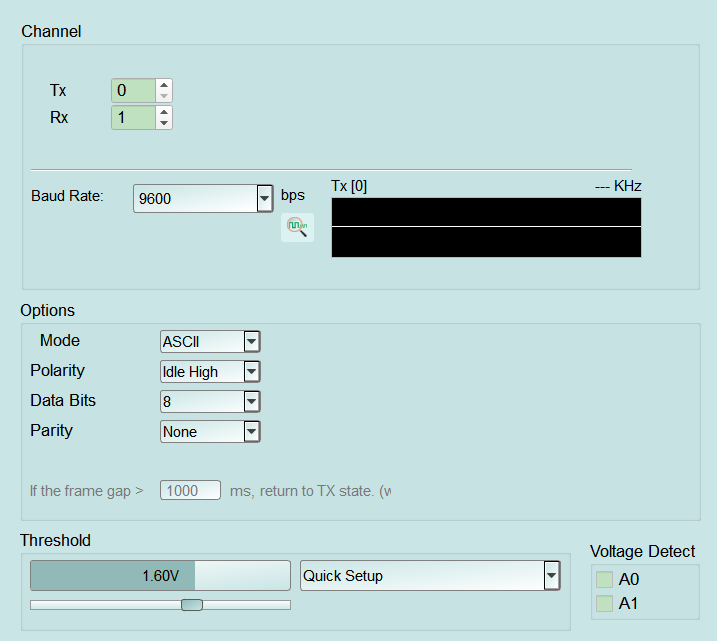
- Settings:
- Baud Rate: Bit rate in bps. A wrong setting can scramble decoding; choose from the list (some UIs also offer waveform-assisted baud detection). Default: 9600.
- Mode: Modbus frame format. RTU (binary + CRC) / RTU N-8-1 (RTU with 8 data bits, no parity, 1 stop bit) / ASCII (ASCII hex + LRC). A wrong setting misaligns frame boundaries. Default: RTU.
- Polarity: Voltage level when Idle. Idle High is a common setting; Idle Low is for inverted signaling. A wrong setting inverts Start/Stop detection. Default: Idle High.
- Data Bits: Data bits per character (4–16). Default: 8.
- Parity: None / Odd / Even. A wrong setting can produce parity errors or wrong characters. Default: None.
- Frame gap timeout: If the frame gap > [n] ms, return to TX state (half-duplex direction control). Field enabled (Enable) only when Tx and Rx use the same channel, or on RS485 products with Two-Wire; otherwise the field is disabled (Disable). RS485 also offers Two-Wire / Four-Wire (default Two-Wire). Default: 1000 ms.