SPI (Serial Peripheral Interface)
SPI Protocol Analyzer settings. Word Wrap only affects how decoded results are segmented. For Channel UI differences by product family, see Settings.
Supported Models
TravelBus
All TB1000/TB2000/TB3000 models are supported.
LA3000/LA4000
All LA3000 models are supported except F series, all LA4000 models are supported.
TravelLogic
All TL3000/TL4000 models are supported.
BusFinder
BF6000 is supported only on B series, all BF7000 models are supported.
Protocol Exerciser
PX2816B is supported.
MSO2000/3000
All MSO1000/MSO2000/MSO3000 models are supported.
TravelScope 3000
All TS3000 models are supported.
Settings
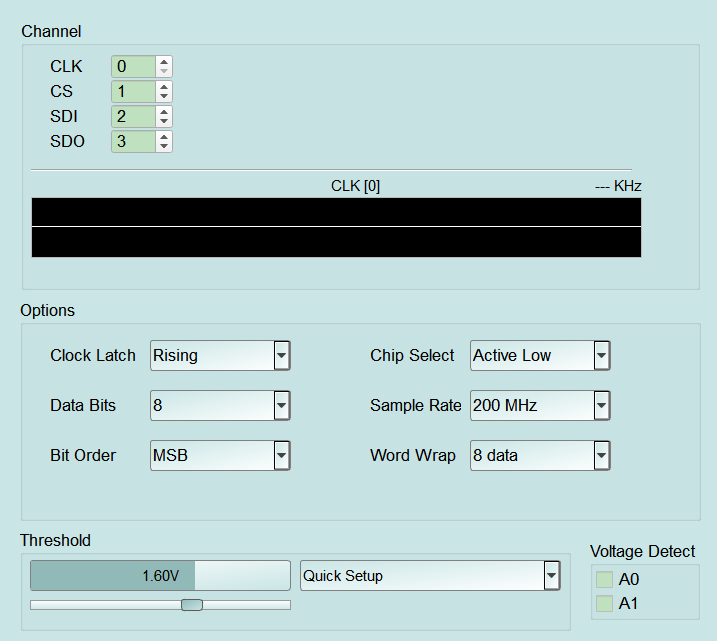
- Settings:
- Clock Latch: Rising / Falling data latch edge. A wrong setting can shift decoding. Default: Rising.
- Chip Select: Active Low / Active High. Default: Active Low.
- Data Bits: Data bits per character (4–8). Default: 8.
- Sample Rate: SPI analysis sample rate (choices vary by product; e.g. TravelLogic/MSO: 20/100/200 MHz/1 GHz). Too low may fail to decode high-speed SPI. Default: 3rd list item (TravelLogic/MSO: 200 MHz).
- Bit Order: MSB / LSB. A wrong setting reverses bit order within each word. Default: MSB.
- Word Wrap: How decoded results wrap/segment. 8 data wraps every 8 data words; All block data shows a whole transfer block (e.g. one CS-active period). Default: 8 data.