eMMC (Embedded MultiMediaCard)
eMMC Protocol Analyzer settings.
For application notes, probe connection, and measurement details, see Protocol Solution — eMMC.
Supported Models
BusFinder
BF6000 is supported only on B series, all BF7000 models are supported. This feature requires purchasing an additional option.
MSO2000/3000
| MSO2008E | MSO2116E | MSO2116B | MSO2216B | MSO2216B+ | MSO2416B+ |
|---|---|---|---|---|---|
| ● | ● | ● |
| MSO2216M+ | MSO2116E+ | MSO2116B+ |
|---|---|---|
| ● |
Settings
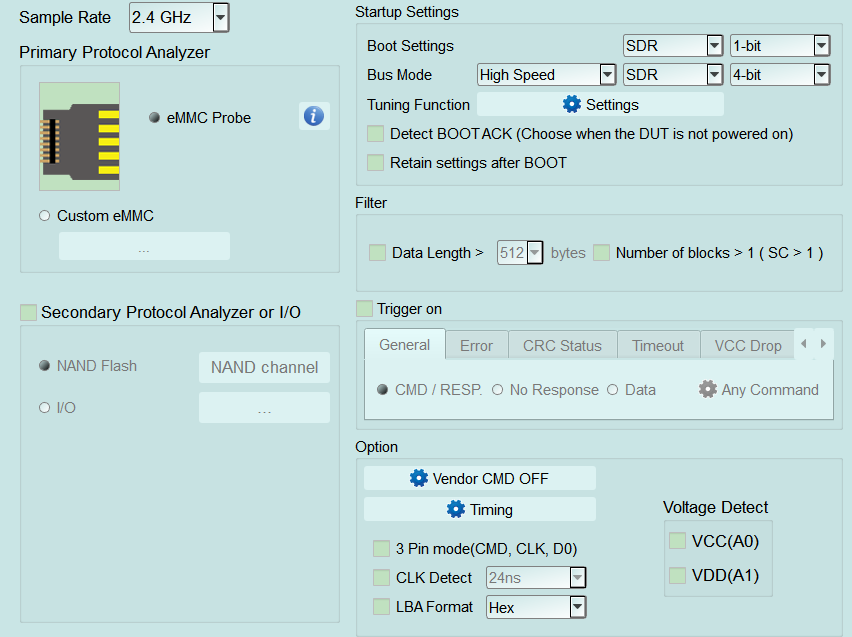
- Settings:
- Sample Rate: Select the sample rate. If Secondary PA (NAND Flash) is enabled, use 1 GHz or below.
- Primary Protocol Analyzer: Choose the probe type (eMMC Probe) or Custom eMMC wiring.
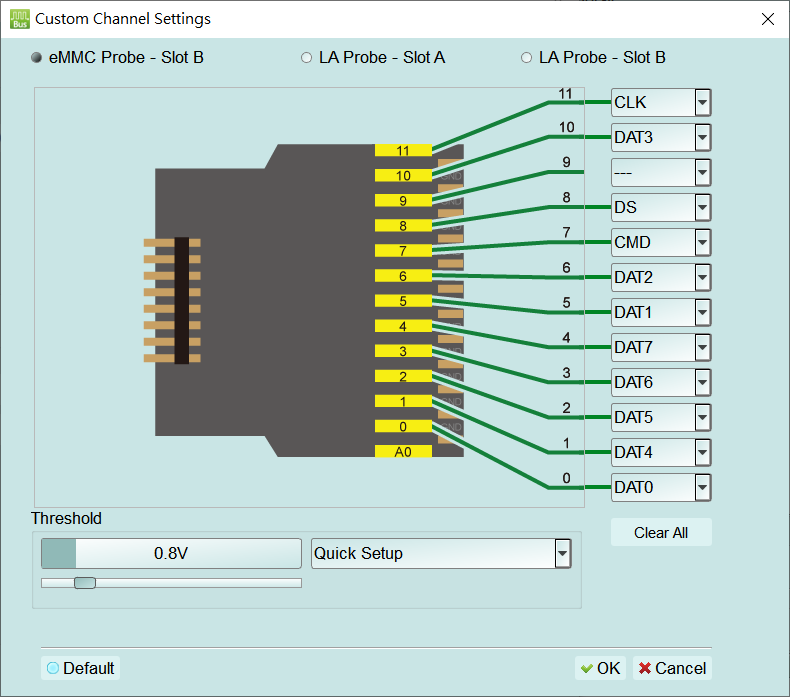
- eMMC Probe: Click the exclamation icon to open Custom Channel Settings; view probe pins mapped to CLK, CMD, DAT0–DAT7, DS, and set Threshold.
- Custom eMMC: Open Custom Channel Settings for custom wiring.
- Signal source: Select eMMC Probe - Slot B, LA Probe - Slot A, or LA Probe - Slot B.
- Pin mapping: Map pins to CLK, CMD, DAT0–DAT7, DS, and related signals.
- Threshold / Quick Setup: Set the trigger threshold, or apply a quick setup.
- Clear All / Default: Clear channel assignments, or restore defaults.
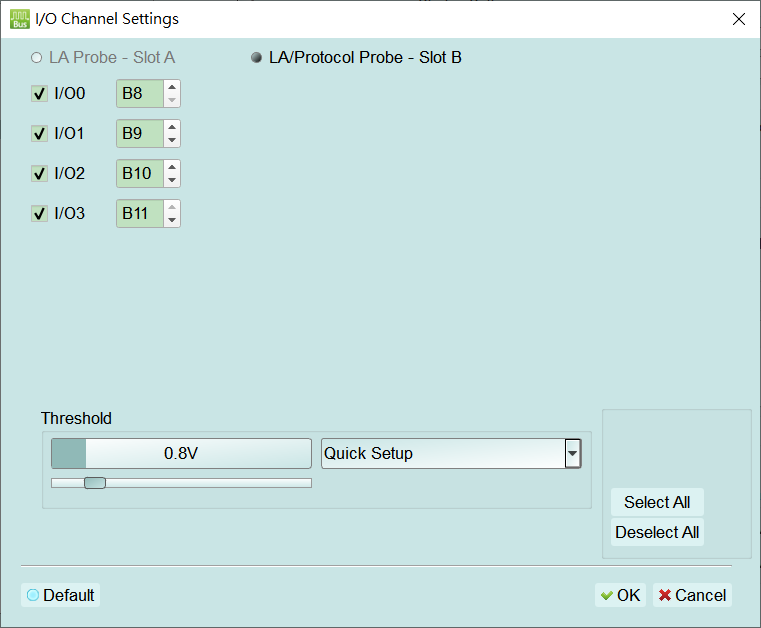
- Secondary Protocol Analyzer or I/O: Run NAND Flash or I/O analysis on remaining pins. For I/O, open I/O Channel Settings.
- Probe source: Select LA Probe - Slot A or LA/Protocol Probe - Slot B.
- I/O0–I/O3: Enable each channel and assign a probe channel (e.g. B8–B11).
- Threshold / Quick Setup: Set the trigger threshold, or apply a quick setup.
- Select All / Deselect All / Default: Select all, clear all, or restore defaults.
- Startup Settings: DUT mode at capture start; Tuning available.
- Boot Settings: Boot-phase bus mode and width (e.g. SDR, 1-bit).
- Bus Mode: Runtime speed/mode/width (e.g. High Speed, SDR, 4-bit).
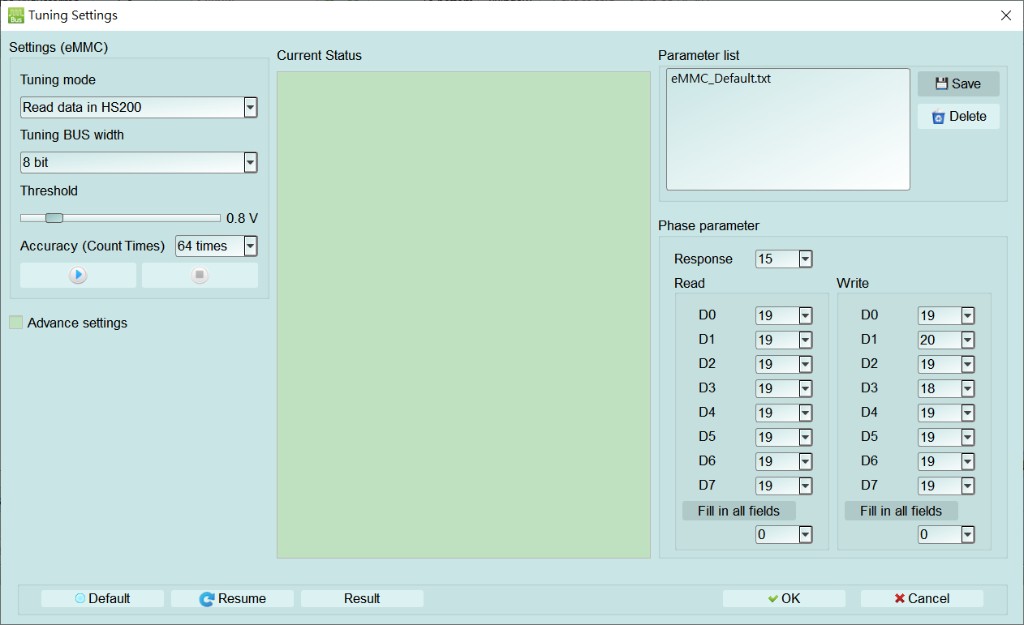
- Tuning Function: Open Tuning Settings for eMMC phase calibration.
- Tuning mode: Select the calibration mode (e.g. Read data in HS200).
- Tuning BUS width: Select the bus width (e.g. 8 bit).
- Threshold: Set the calibration voltage threshold.
- Accuracy (Count Times): Set the measurement count (e.g. 64 times).
- Advance settings: Enable advanced settings.
- Parameter list: Select, save, or delete a phase-parameter file.
- Phase parameter: Set Response and the Read/Write phases for D0–D7; Fill in all fields applies one value to all lanes.
- Current Status / Resume / Result: View calibration status, resume calibration, or view results.
- Detect BOOTACK: Detect BOOTACK when the DUT is not powered on.
- Retain settings after BOOT: Keep settings after boot.
- Filter: Limit recorded payload to save memory.
- Data Length >: Drop trailing data beyond the set byte length per Data Frame.
- Number of blocks > 1 (SC > 1): Filter multi-block transfers.
- Option:
- Vendor CMD: Opens Vendor CMD settings (see Settings — Vendor CMD settings).
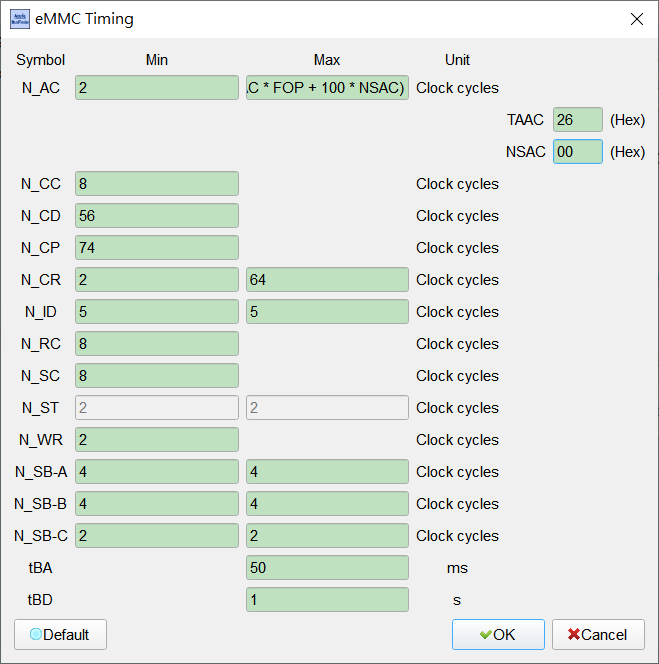
- Timing: Opens eMMC Timing (see dialog below) to set Min/Max/Unit per Symbol (clock cycles or time).
- Symbol / Min / Max / Unit: Set each symbol's minimum, maximum, and unit. Common clock-cycle Defaults: N_AC Min 2; N_CC/N_RC/N_SC Min 8; N_CD Min 56; N_CP Min 74; N_CR Min 2 / Max 64; N_ID Min/Max 5; N_WR Min 2; N_SB-A/B Min/Max 4; N_SB-C Min/Max 2. N_ST Min/Max is often 2 and disabled (Disable).
- N_AC Max: Maximum can be calculated from TAAC, FOP, and NSAC (on-screen formula); enter TAAC/NSAC in hexadecimal. Default often TAAC 26h, NSAC 00h.
- tBA / tBD: Units are ms and s. Default often tBA Max 50 ms, tBD Max 1 s.
- Default: Restore default timing values.
- 3 Pin mode (CMD, CLK, D0): Analyze command flow with CLK/CMD/D0 only. Default: cleared.
- CLK Detect: Detect CLK activity; time condition enabled (Enable) when checked. Default: cleared; time often 24 ns.
- LBA Format: LBA display format. Default: Hex.
- Voltage Detect: Enable VCC(A0) / VDD(A1) as voltage-detect channels (see Settings — Voltage Detect). Default: cleared.
- Trigger settings:
- Trigger on: Tabs General / Error / CRC Status / Timeout / VCC Drop. Children are enabled (Enable) when checked; CMD/RESP., Data, Timeout, and VCC/VDD Drop open matching dialogs (see Settings links). Default: Trigger on and error items cleared.
- General:
- CMD / RESP.: Opens Trigger Settings (see Settings — Trigger Settings).
- No Response: Trigger when there is no response; the gear opens command conditions (button often shows No Resp.(Any CMD)).
- Data: Opens Data Trigger (see Settings — Data Trigger).
- Error: CRC7 error / CRC16 error / End bit error. Default: all cleared.
- CRC Status: Set CRC Status Pattern (Positive / Negative).
- Timeout: Opens Timeout Trigger (see Settings — Timeout Trigger).
- VCC Drop / VDD Drop: Voltage-drop trigger; open Voltage Range Settings (see Settings — Voltage Range Settings). Default: cleared.
- General:
- Trigger on: Tabs General / Error / CRC Status / Timeout / VCC Drop. Children are enabled (Enable) when checked; CMD/RESP., Data, Timeout, and VCC/VDD Drop open matching dialogs (see Settings links). Default: Trigger on and error items cleared.
Open this dialog from the exclamation icon when Primary Protocol Analyzer is eMMC Probe, or when Custom eMMC is selected. Choose the signal source (eMMC Probe - Slot B / LA Probe - Slot A / LA Probe - Slot B), map pins to CLK, CMD, DAT0–DAT7, DS, and related signals, and set Threshold or use Quick Setup. Use Clear All to clear assignments, or Default to restore factory mapping.
With Secondary Protocol Analyzer or I/O set to I/O, open this dialog to choose the probe source (LA Probe - Slot A / LA/Protocol Probe - Slot B), enable I/O0–I/O3 and assign channels, and set Threshold or use Quick Setup.
Open this dialog from Startup Settings → Tuning Function. Configure Tuning mode, BUS width, Threshold, and Accuracy, and set Response plus Read/Write phases for D0–D7. Manage parameter files with Save/Delete, and use Resume/Result to continue or review calibration.
Open this dialog from Option → Timing. Set Min/Max/Unit for each Symbol (clock cycles or time). N_AC Max can be calculated from TAAC, FOP, and NSAC (Default often TAAC 26h, NSAC 00h); tBA/tBD Default often Max 50 ms / 1 s. N_ST may be disabled (Disable). Use Default to restore factory values.