SpaceWire
SpaceWire (ECSS-E-ST-50-12C) is the onboard data-handling link used on spacecraft. Each direction carries two lines, Data and Strobe: exactly one of them changes per bit, so the clock is recovered as Data XOR Strobe and no separate clock line is needed. A full-duplex link is therefore four signals.
The standard fixes a 2 Mb/s minimum and a mandatory 10 Mb/s start-up rate, but sets no maximum — the ceiling comes from the equipment and from the skew between the Data and Strobe lines. The decode measures the rate on each direction independently and reports it, so the two directions may run at different rates.
Probe all four signals for a full-duplex measurement, or two for a single direction. If Data and Strobe are swapped on a pair, Auto-detect Data / Strobe resolves it and the report says what it resolved to.
Decode Settings
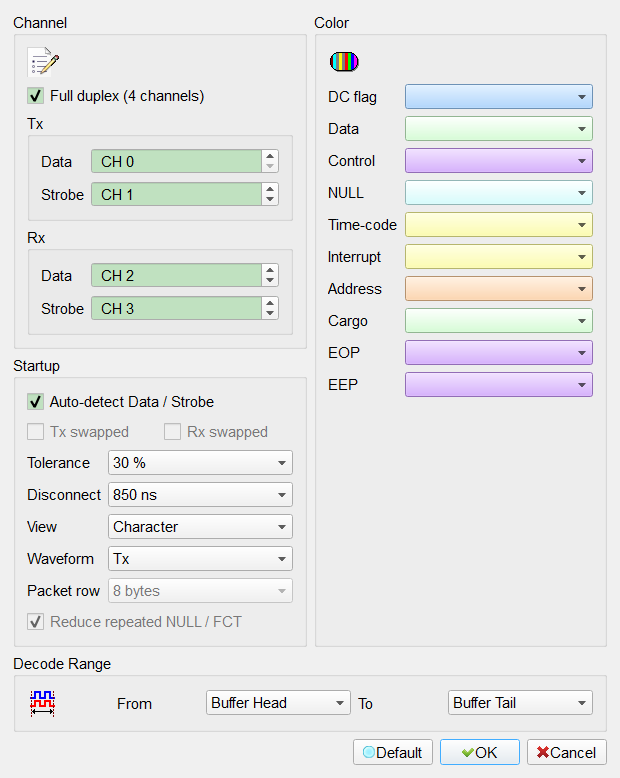
- Full duplex (4 channels): Decode both directions. When cleared, only the Tx pair is read and everything that lives across the two directions — flow-control credit, the initialisation handshake, and which end caused a disconnect — cannot be shown. Default: checked.
- Auto-detect Data / Strobe: Work out which line of each pair is Data and which is Strobe. Swapping them still yields a valid clock, so the mistake does not stop the decode — it silently corrupts the data. Leave this on unless you have a reason not to. Default: checked.
- Tx swapped / Rx swapped: State the assignment by hand. Enabled only when Auto-detect is cleared, because auto-detection overwrites them. Default: cleared.
- Tolerance: How far a bit may deviate from the measured bit period before it is treated as a fault, from 5 % to 50 %. Raise it for a long cable or a link with visible skew. Default: 30 %.
- Disconnect: How long the line may stop transitioning before the link is reported as disconnected, from 727 ns to 4000 ns. The standard defines a window rather than one value. Default: 850 ns.
- View: Which layer the waveform and the report present.
Field — the parts inside one character: the data bits, the parity bit and the data-control flag. Use it when characters are not decoding at all.
Character — one row per character or control code.
Packet — one row per packet, with the cargo bytes.
Credit — flow-control credit over time; the only view that needs both directions, and therefore the only one not available in Live mode.
Default: Character. - Waveform: Which direction the waveform strip draws. Outside Live mode the report carries both. At the same bit rate the two directions' characters land almost on top of each other, so drawing both in one row would leave most blocks a single sample wide — this picks one. Enabled only in full duplex. Default: Tx.
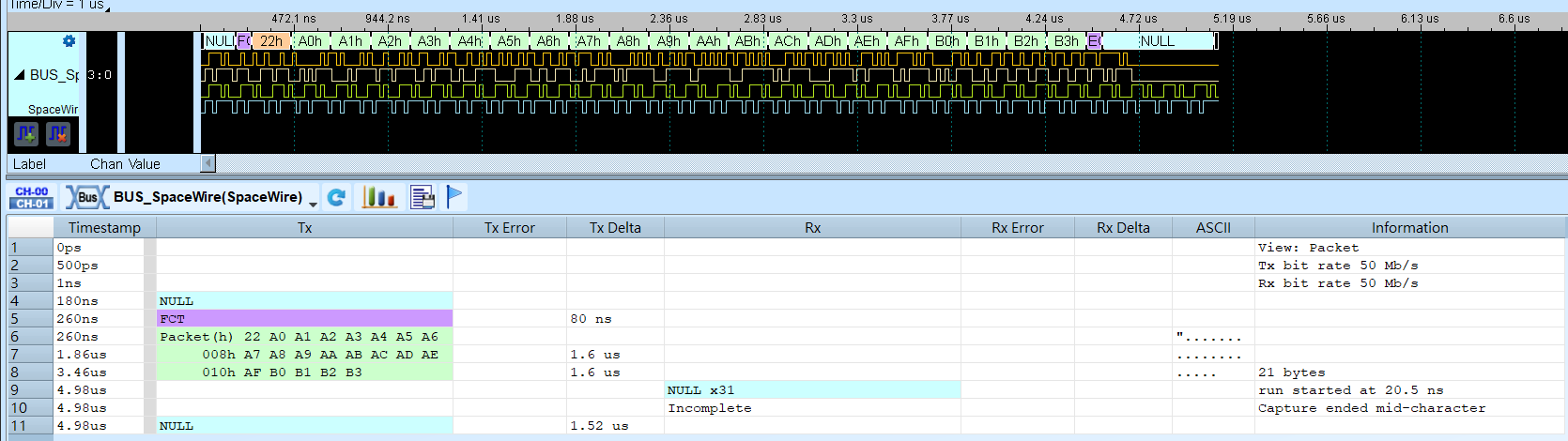
- Packet row: How many cargo bytes one row of the packet report carries before the packet continues on the next row. SpaceWire packets have no maximum length, so long packets always wrap; the continuation rows are marked with the byte offset (
008h,010h, …) and the last row carries the total. Enabled in Packet view. Default: 8 bytes. - Reduce repeated NULL / FCT: Collapse a run of NULLs or FCTs into one row. An idle link transmits NULLs continuously, so a real capture is mostly NULLs and the packets are lost among them. Enabled in the views that aggregate rows. Default: checked.
Result
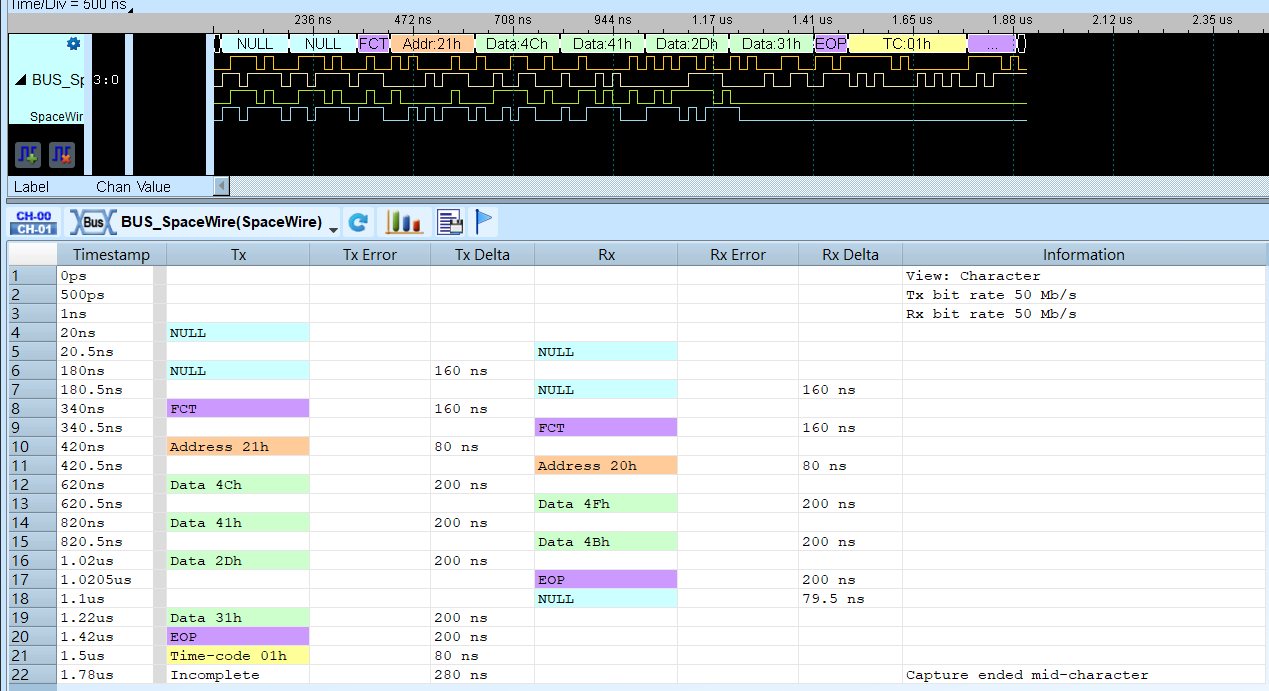
Each direction has its own Event, Error and Delta columns, so the two streams stay readable side by side. Delta is the interval to the previous event in the same direction.
In Packet view a packet becomes one row, and a payload too long for one row continues on the next:
Live mode
SpaceWire decoding supports Live mode (decoding while a capture is still running), with the limitations below. The decoder follows the stream as it arrives: characters are decoded batch by batch, and character synchronisation - which happens only once, when the link starts - is carried across the batches.
Three things a live decode cannot show. All three are available as usual once the capture has been saved and decoded from the file.
- The report shows one direction only - the one the waveform strip is set to (the Waveform setting). The waveform strip has always drawn a single direction, and in Live mode the report is built from the same stream. The report states which direction it is showing.
- Credit view is not available. An FCT travels the opposite way from the data it authorises, so credit can only be worked out with both directions in front of you. Selecting it in Live mode reports the Character view instead and says so in the Information column, rather than showing a credit figure that would drift into a false credit error on a healthy link.
- The measured bit-rate row is not shown, for the same reason: it travels in the report's own stream rather than in the waveform stream.