NAND Flash
Flash memory includes NOR and NAND types. NAND Flash offers higher density and lower cost per bit than NOR, but its I/O interface has no random-access external address bus and must be read in blocks. NAND Flash is common in USB drives and most memory cards.
Wrong Device Width, startup mode, or tREA/tDQSQ settings misread data. For channel-prefix differences, see Settings.
Decode Settings
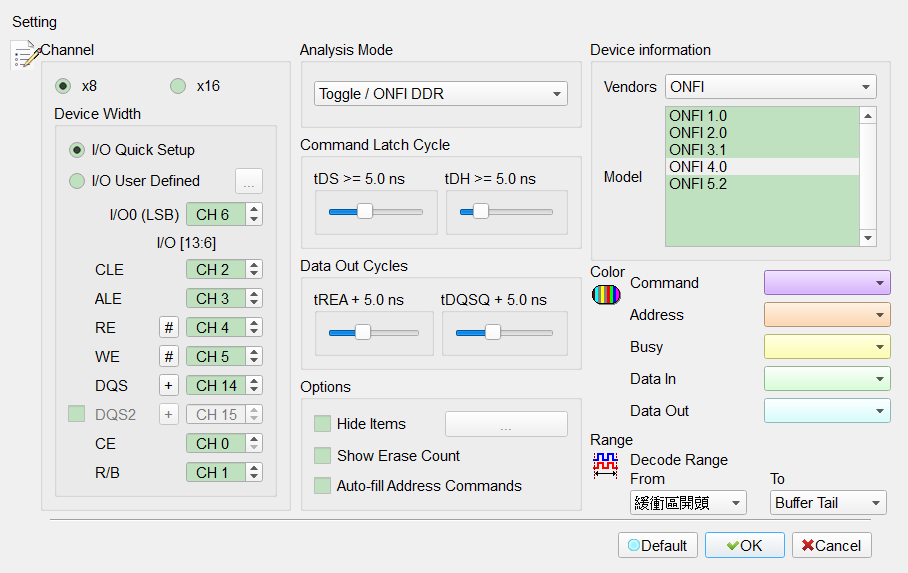
- Channel: Assign CLE, ALE, RE, WE, CE, R/B, DQS, and I/O channels.
- Device Width: Select 8/16-bit data width. Default is x8.
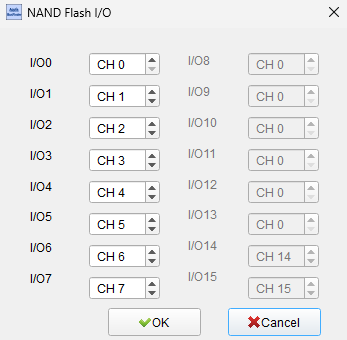
- I/O Quick Setup/I/O User Defined: Quick Setup only needs I/O0 (LSB); other I/O channels auto-expand. User Defined opens a dialog to set each I/O channel. Default is I/O Quick Setup.
- Flash Startup/Analysis Mode: Includes SDR and Toggle/ONFI DDR. Default is Toggle/ONFI DDR (index 1).
- tREA/tDQSQ (and tDS/tDH): Delay for reading NAND data in SDR/DDR. Devices often provide presets; adjust if sampling on transitions yields bad data. Default slider values are commonly 5.
- Save the NAND Flash Data: Save Read/Write data as Bin under the LA work directory. Field enabled (Enable) when checked.
- Don't show BUSY state: Show/hide BUSY START/BUSY END in the report. Field enabled (Enable) when checked.
- Show Erase Count: Show Erase command/address statistics. Field enabled (Enable) when checked. Default is unchecked.
- Hide Items: Show/hide report items by condition. Field enabled (Enable) when checked. Default is unchecked.
- Invert RE# (W/R#)/Invert DQS: Use when RE/DQS# are inverted in DDR mode. Field enabled (Enable) when checked.
- Not filled address/Auto-fill Address: When auto-fill is off, addresses are computed and filled; when on, address fields are not filled. Default: Auto-fill Address unchecked.
- Don't care ALE/CE#/RB#: Ignore selected pins; ignoring ALE requires 2 or 3 byte Row Address. Field enabled (Enable) when checked.
- Bytes per report row: 8/16/24/32. Default is 16.
- Saved file name example: e.g.
NF_DI_Row017821h_Col0000h_CE1_1.bin; compare with the report. - Device information:
- Vendors: Select a matching or command-compatible device; Custom builds a command table (below). Default vendor is ONFI.
- Model: Supported NAND Flash model. Default model list index is 3.
- Custom command table: Create AqNFCustom.txt in the LA work directory when Vendor is Custom. Keywords Manufacturer, PartNo, #CE/RB, X16, SyncMode, and Cmd are required and must not be changed.
- Example lines:
Cmd=Read, Read, tR, 60, , , N, N, N, 00, 30;Cmd=Read Status, Read Stat., , , , , Y, N, Y ,70;Cmd=Two-Plane Page Program, TPP Prog., tDBSY, 1, tPROG, 5000, N, Y, N, 80, 11, 81, 10. - Field notes:
- Full/abbreviated names: e.g. Read Status/Two-Plane Page Program vs Read Stat./TPP Prog. for short waveform labels.
- Busy Time Check: e.g. tDBSY = 1 µs, tPROG = 5000 µs; violations appear in the report. Leave blank with commas to skip; names are user-defined.
- Three flags: For
Cmd=Read Status, Read Stat., Y, N, Y ,70: 1st Y = allowed during Busy; 2nd N = insertion restricted; 3rd Y = may insert into multi-step commands (e.g. 70h between 11h and 81h of Two-Plane Page Program). Custom shows the file vendor/model and decodes by the command list.
- Timing Check: Add the following at the top of AqNFCustom.txt when needed.
- Spec: ONFI or Toggle only.
- Version: ONFI: SDR/NV-DDR/NV-DDR2-3; Toggle: Legacy/1.0/2.0.
- TimingCheck: Y/N. Format: Item Name, Min, Max (ns). Use appendix item names for the selected Spec/Version; others are ignored. Use X to skip a bound; both X skips the item.
- Results: Information field: red = out of range, black = OK; includes item, measured time, and limits.
- Average notes: tDQSH/tDQSL: 0.45 × tDSC(avg); tQSH/tQSL: 0.37 × tRC(avg); tREH/tRP: 0.43 × tRC(avg). Add the matching header lines when using averages; otherwise UsedtRCavg=N/UsedtDSCavg=N or Min/Max values.
Result
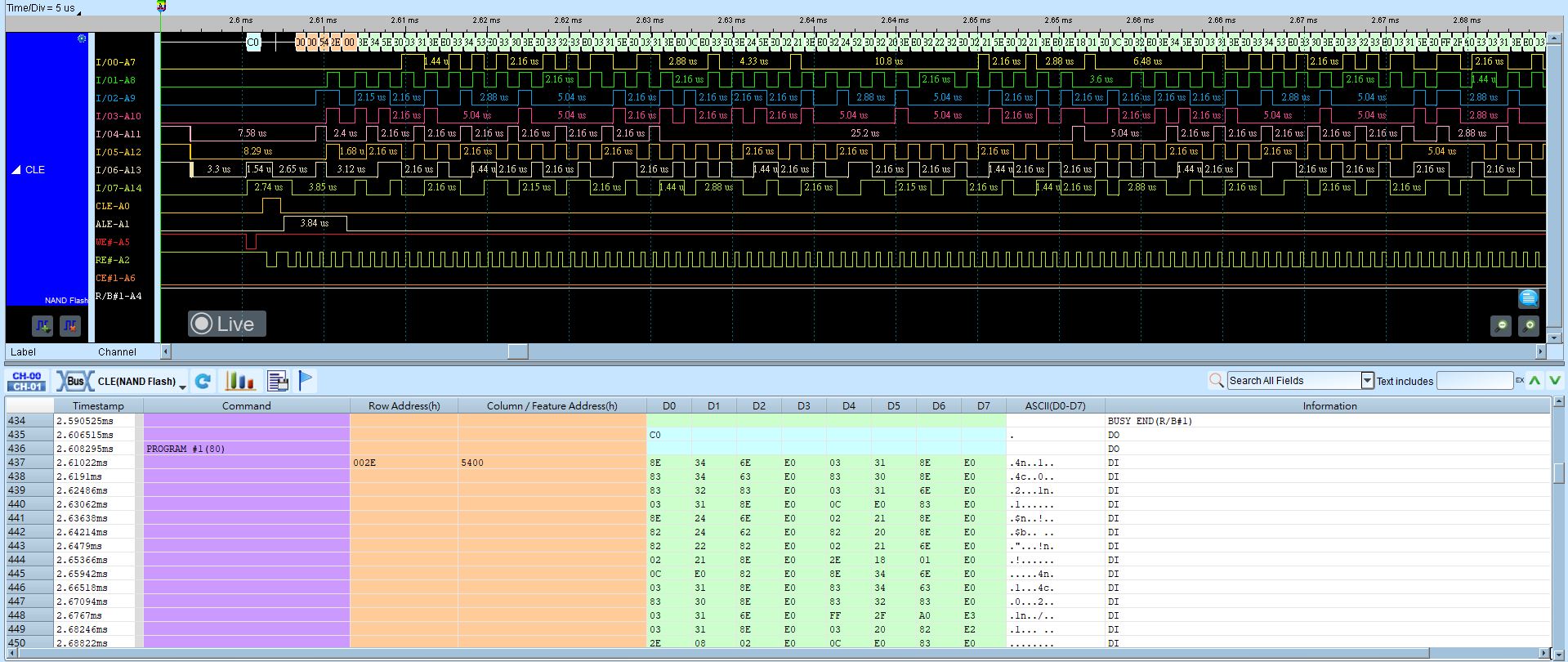
Timing Check
