NAND Flash SCA (NAND Flash Separate Command Address)
NAND Flash SCA (Separate Command Address) decodes NAND Flash traffic when Command/Address use a dedicated CA bus, unlike classic CLE/ALE sharing the data bus in NAND Flash. The plugin family is shared, but channel labels, Analysis Mode, and SCA Header are SCA-specific.
Wrong Analysis Mode, CA/CLK wiring, or Channel Phase Delay mis-decodes commands, addresses, or data. For channel-prefix differences, see Settings.
Decode Settings
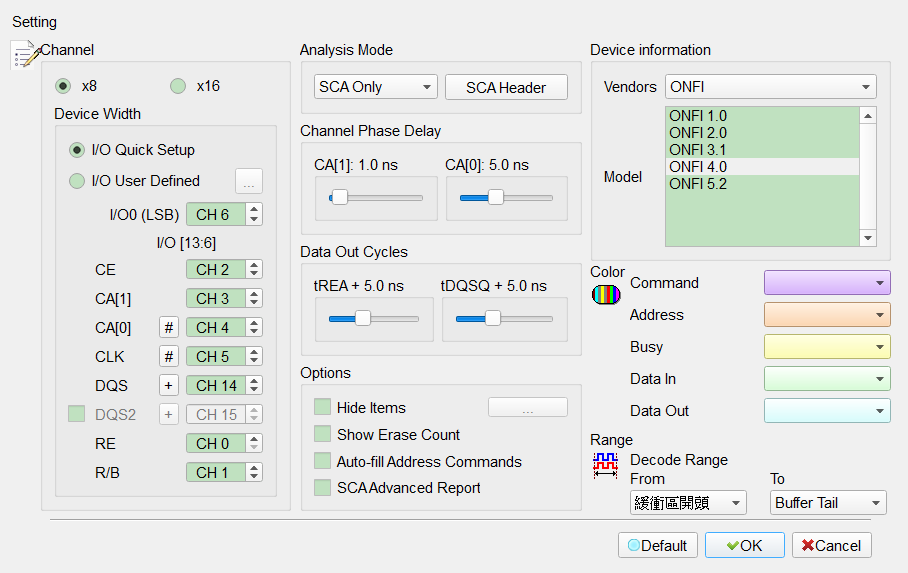
- Device Width: Data width x8/x16. Default is x8.
- I/O Quick Setup/I/O User Defined: Quick Setup only needs I/O0 (LSB); other I/O channels auto-expand. User Defined opens a dialog for each I/O channel. Default is I/O Quick Setup.
- Channel: Assign SCA signals to logic analyzer channels (channel numbers omitted from Defaults).
- I/O0 (LSB)/I/O range: Data lines; x16 adds upper I/O.
- CA_CE: Chip Enable group. Use … to open CA_CE Groups (below) for multiple CE channels.
- CA[1]/CA[0]: Command/Address bus bits.
- CLK: CA clock.
- DQS/DQS2: Data strobes. Checking DQS2 enables (Enable) the DQS2 channel; Default is unchecked.
- RE/R/B: Read Enable and Ready/Busy.
- Analysis Mode: SCA Only (CA/SCA packets only), DQ Only (data path only), or SCA (SCA plus data). Default is SCA.
- SCA Header: Opens SCA Decode Reference (below) to map Header 0x0–0xF to Kind and decode method. Hidden/disabled when Analysis Mode is DQ Only.
- Channel Phase Delay: CA sample-phase sliders for CA[1]/CA[0]. Default: CA[1] = 1, CA[0] = 5 (shown in ns when sample rate is known).
- Data Out Cycles (tREA/tDQSQ): Read-data delay. Default is 5 for both (shown in ns when sample rate is known). Adjust if sampling on transitions yields bad values.
- Options:
- Hide Items: Show/hide report items by condition; use … after checking. Field enabled (Enable) when checked. Default is unchecked.
- Show Erase Count: Show Erase command/address statistics. Field enabled (Enable) when checked. Default is unchecked.
- Auto-fill Address Commands: Auto-fill report Address fields. Field enabled (Enable) when checked. Default is unchecked.
- SCA Advanced Report: More detailed SCA report output. Shown only when Analysis Mode is SCA; field enabled (Enable) when checked. Default is unchecked.
- Device information:
- Vendors: Select a matching or command-compatible vendor; Custom builds a command table (see NAND Flash). Default vendor is ONFI.
- Model: Supported spec/model list. Default list index is 3 (commonly ONFI 4.0 for ONFI).
- Bytes per report row: 8/16/24/32. Default is 16.
CA_CE Groups
Open with … next to CA_CE. Assign Channel and Used for CE0–CE7. Group 1 (primary CA_CE) is always enabled; other groups are enabled (Enable) when Used is checked. Default: only Group 1 enabled; other group channels are 0.
SCA Header (SCA Decode Reference)
Opens from SCA Header. Maps Header 0x0–0xF to Kind (CA Packet Type) and decode method (Output/Input/VSP/Reserved). Saved as sca_decode_reference.txt in the work directory; Restore Default reloads the built-in table (e.g. 0x0 = CA Data Output/Output, 0x2 = Command/Input, 0x8 = CA Data Input/Input).
Shared Custom command tables (AqNFCustom.txt) and Timing Check format are described under NAND Flash.